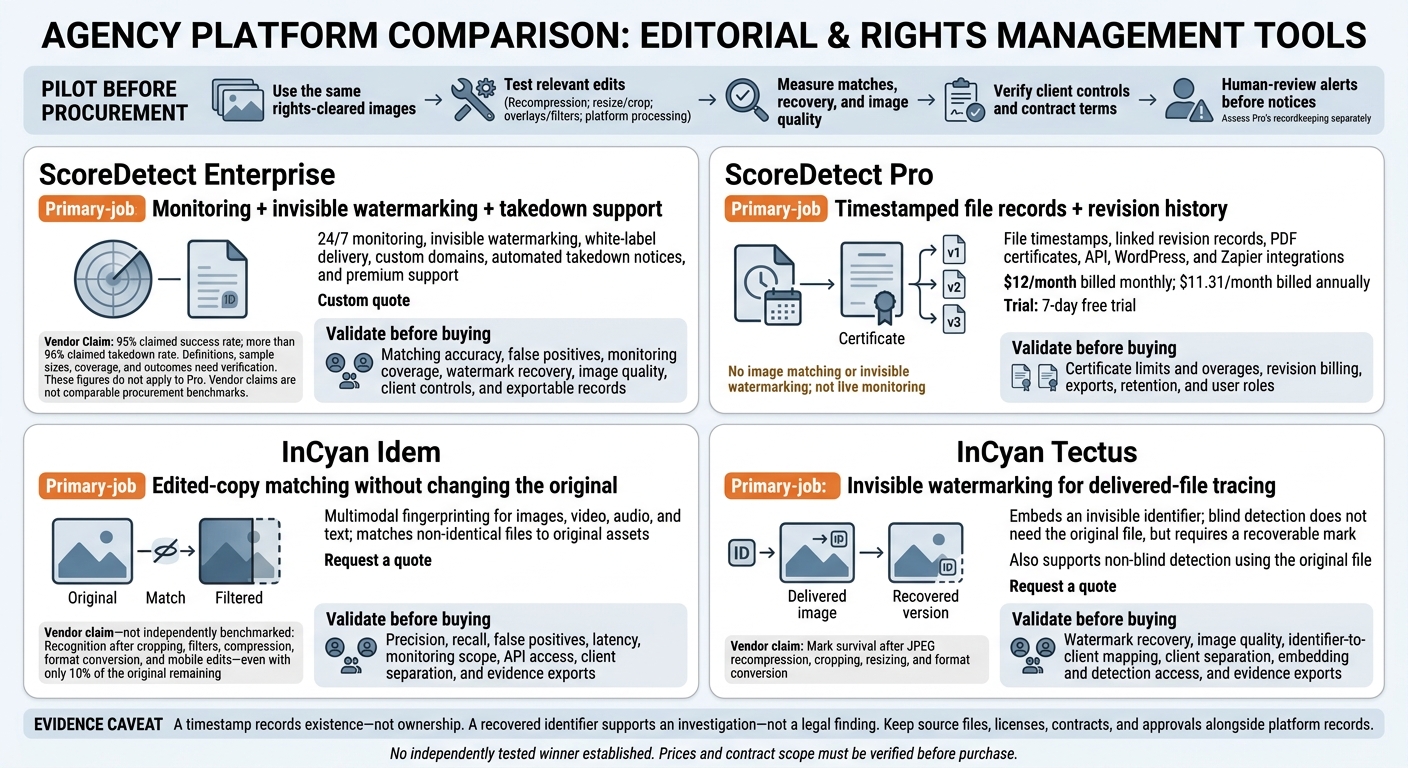
I would choose a platform with edited-image matching, invisible watermarking, 24/7 monitoring, and exportable records for agencies that need both reuse detection and file tracing in 2026.
My shortlist is ScoreDetect Enterprise, ScoreDetect Pro, InCyan Idem, and InCyan Tectus – but they serve different jobs. I compare matching, watermark survival, dated records, client controls, and cost; the supplied material does not establish a tested winner.
Quick Comparison
| Option | Main use | Price | What I would check |
|---|---|---|---|
| ScoreDetect Enterprise | Monitoring, invisible watermarking, and takedown support | Custom quote | Detection accuracy, mark recovery, and client controls |
| ScoreDetect Pro | File timestamps and revision records – not matching or watermarking | $12/month, or $11.31/month billed annually | Certificate limits, exports, and retention |
| InCyan Idem | Matching edited copies without changing the original | Request a quote | Its claim of matching with only 10% of an image remaining |
| InCyan Tectus | Invisible watermarking with detection that can work without the original | Request a quote | Mark survival, image quality, and client separation |
I treat performance percentages as vendor claims, not test results. <u>Secure file timestamping records file existence – not ownership.</u> Before buying, I would test the same images across each relevant service, check permissions before sending notices, and get workflow limits in writing.
Agency Image Protection Platforms: 2026 Comparison
How to Hide a Watermark in an Image
sbb-itb-738ac1e
1. ScoreDetect Enterprise
ScoreDetect Enterprise is a custom-quote package for agencies that need 24/7 monitoring, invisible watermarking, white-label delivery, custom domains, automated takedown notices, and premium support.[1] Think of it as a monitoring and evidence layer – not just a watermarking tool.
Recognition and Edit Resilience
Agencies need to know whether Enterprise can identify reused images after common edits. The available information includes no Enterprise benchmarks for image-recognition accuracy, false-positive rates, or crop resistance.
Run a controlled pilot with rights-cleared images. Test originals, recompressions, resizes, screenshots, crops, color edits, and text overlays. Track true positives, false positives, detection time, and whether detection survives a 10% crop.
Watermark Durability and Image Quality
The available information includes no independent measurements of watermark survival or its effect on image quality. Confirm how watermark extraction works, then test recovery after cropping, resizing, compression, and other edits. Before delivering images to clients, review them visually and run an objective quality check.
Ownership Evidence and Enforcement
ScoreDetect’s certificate workflow checks a file against its recorded hash.[4] Keep certificates alongside source files, licenses, and client approvals.
Confirm who authorizes takedown notices and handles disputes. Every alert should go through human review before a notice is sent.
Agency Workflows and Cost
Technical performance matters, but the workflow also needs to fit client delivery. The available information does not confirm client workspaces, role permissions, quotas, approvals, bulk-upload limits, audit logs, or client-level billing.
Request a written quote that covers volume, onboarding, formats, file-size limits, batch uploads, API usage, watermark licensing, overages, retention, and deletion. No public per-image or per-client Enterprise rate is provided.[1] Agree on contractual terms for monitoring coverage and response times before promising clients an automated workflow.[1]
2. ScoreDetect Pro
For agencies that need proof of approved versions rather than live monitoring, Pro keeps an evidence trail. ScoreDetect Pro records timestamps and revisions to provide dated proof of file versions. It does not offer image matching or invisible watermarking.
Timestamping and Certificates
A certificate provides dated evidence that a file existed in a specific form at a specific time. It does not prove copyright ownership. You can export certificates as PDFs for licensing files and client reports.
Linked Revision History
Pro links successive records into a revision trail.[1][5] Use it for approved masters and final delivery files. An earlier certificate should not be used to validate an asset that has materially changed.
Workflow Automation
Product materials describe API access, a WordPress plugin, and Zapier automations.[6] Keep the client name, campaign, asset ID, creator, license scope, and revision date in your own system. These details help organize approval and licensing records; Pro is not an asset surveillance tool.
Cost and Usage Checks
The official pricing page lists Pro from $11.31 per month when billed annually, with a 7-day free trial.[1] Check billing terms and taxes at checkout.
3. InCyan Idem
Multimodal Matching
Idem is a multimodal fingerprinting tool for images, video, audio, and text. It matches non-identical files to original assets.[7][8] For agencies, that means tracking reused client imagery without changing the original file, including when others edit it.
Recognition After Edits
InCyan claims Idem can recognize images after cropping, filters, compression, format conversion, and edits made on mobile devices – even when only 10% of the original remains.[7] No independent benchmark is cited.
Test this claim with your own assets. Ask for precision, recall, false-positive rates, latency, search index size, and monitoring scope. When a match appears, keep a clear record for review.
Investigating Matches
Save the original file, derivative, source URL, discovery time, analyst notes, and license records. Check which records you can export and which must stay in your case system.
Agency Integration and Licensing
Public pricing, API specifications, and multi-client controls remain unverified, so ask the vendor to confirm them. Check how client separation works across workspaces, projects, collections, permissions, and client-specific retention policies.
Ask whether billing depends on indexed assets, monitored sources, storage, API calls, searches, or seats – and whether white-label reports cost extra. Also confirm data ownership, permission to use data for model training, deletion terms, data-processing locations, rate limits, and service levels.
These workflow limits deserve as much attention as match quality in the multi-client agency assessment and technical comparison below.
4. InCyan Tectus
Fingerprinting finds reused assets. InCyan Tectus takes a different approach: it embeds a mark in the file itself. For agencies, that means tracing delivered files rather than just detecting reuse.
Blind Watermarking
InCyan Tectus embeds an invisible identifier in an asset instead of recognizing the image itself. Blind detection doesn’t need the original file, but the copy must still contain a recoverable mark. Tectus also supports non-blind detection, which uses the original file and can improve some workflows.[9]
Neither mode stops copying. Identifying a file after distribution depends on whether the mark survives edits.
Mark Recovery and Ownership
Detection extracts the embedded identifier and links it to client ownership, licensing, or distribution records.[9] InCyan says ProofChain hashes and timestamps authenticating digital images and provenance data for external verification.[10]
A recovered identifier supports an investigation – not a legal finding. Agencies still need to check the license and the context in which the asset was used.
Durability and Image Quality
Tectus is described as surviving JPEG recompression, cropping, resizing, and format conversion. However, no independent recovery success rates or image-quality data are provided.[9]
Test those changes on a representative sample of client assets. Compare marked and unmarked exports at delivery resolution, then record both recovery failures and visible changes before approving production use.
Agency Integration and Licensing
For agencies, workflow fit matters as much as watermark strength. Check how watermarking fits into export, distribution, and client separation. Confirm how identifiers map to client records and whether detection results can be exported.
Public pricing, API quotas, and agency-seat limits were not identified.[9] Request a quote for your deployment that covers embedding, detection, client separation, and support.
Technical Comparison: Matching, Watermark Survival, and Ownership Records
Recognition and Edit Resilience
ScoreDetect Pro provides blockchain timestamping. Enterprise adds content protection services for matching and watermark survival.
The table separates documented features, vendor claims, and details that still need verification.
| Offering | Documented functionality | Vendor claims | Unknowns to verify |
|---|---|---|---|
| ScoreDetect Enterprise | Pro’s records plus 24/7 monitoring, invisible watermarking, and automated takedown notifications | 95% claimed success rate; more than 96% claimed takedown rate | Matching accuracy, edit thresholds, monitoring coverage, watermark recovery, and what the percentages measure |
| ScoreDetect Pro | Blockchain timestamping, verification and formal recognition certificates, revision history | No published edit-resilient recognition or watermarking claim | Image recognition and watermarking are not documented |
| InCyan Idem | Multimodal asset matching against a reference database | Recognition after editing, cropping, and compression – even with only 10% remaining | Accuracy by transformation, false positives, reference requirements, detection access |
| InCyan Tectus | Invisible blind watermarking | Claimed survival after common edits [9] | Recovery thresholds, partial-image performance, detection interfaces, image-quality impact |
No vendor-supplied pilot results were provided.
These percentages are vendor claims, not procurement benchmarks. For Enterprise’s 95% figure, ask whether “success” means accessing blocked sites or finding infringing pages. For its more-than-96% figure, separate accepted notices from removed pages, delisted URLs, and resolved cases.
Request the test period, sample size, geographic and platform coverage, duplicate-notice treatment, and a recent report. These figures do not apply to Pro. Test Idem’s 10%-remaining claim across image types and crop locations.
Watermark Durability and Image Quality
Test each applicable service with the same labeled client originals and derivatives. Assess Pro’s recordkeeping separately. Include unrelated images, visually similar images, and images used with permission. Group transformation tests into recompression, resize/crop, overlays/filters, and platform processing.[11]
Measure false positives, missed matches, watermark recovery, confidence, detection time, and the smallest surviving image area. Compare marked and unmarked files at 100% and 200% zoom, paying close attention to gradients, skin tones, shadows, and flat colors. Set acceptance thresholds before testing, and label untested outcomes as unknown.
Ownership Evidence and Enforcement
Use this checklist to assess what each platform can support in an agency workflow. A listed feature does not establish complete, immutable records or suitability for a particular dispute. Confirm the evidence details below.
| Evidence type | ScoreDetect Enterprise | ScoreDetect Pro | InCyan Idem | InCyan Tectus |
|---|---|---|---|---|
| Match confidence | Score, threshold, calibration, matched-region review | Not documented | Score, threshold, calibration, matched-region review | Recovery confidence, identifier validation |
| Discovery records | URL, platform, capture time, screenshot, source image, detector output, chain of custody | Web discovery: not documented | Matched-asset context, source image, detector output, chain of custody | Detection export, provenance context |
| Version history | Revision history, protection-event logs, audit-log immutability | Revision history, audit-log immutability | Not documented | Watermark versions, user-action logs |
| Checksums | Hash algorithm, file scope, behavior after editing | SHA-256 listed in certificates | Not documented | Checksum availability |
| Blockchain records | Recorded data, submitter, timestamp, independent verification | Public blockchain, ledger URLs | Not documented | Blockchain record availability |
| Certificates | Issuer, contents, retention, export format | Verification and Formal Recognition certificates; single/bulk PDF export | Not documented | Availability, issuer, contents, retention, export format |
An exact-file checksum proves identity or integrity only for the exact hashed file. Changes to pixels, metadata, or encoding generally change SHA-256, so the hash does not track edited versions.
A timestamp records that something existed by a certain time. It does not establish authorship, lawful ownership, originality, or chain of title. Blockchain anchoring also does not validate the submitted rights claim.
Vendor-issued certificates are not the same as U.S. Copyright Office registration and are not guaranteed legal proof. Keep source files, creation records, contracts, licenses, model releases, upload logs, and correspondence alongside exported platform evidence.
Agency Workflows, Client Management, and Pricing
Once you’ve checked matching and watermark durability, test how the platform fits your agency’s day-to-day work. Keep a consistent asset record with the client, campaign, asset ID, version, rights holder, license terms, territory, channel, and approval status. Link revisions and proofs to the original, apply watermarks only where included, and distribute approved files. Before exporting evidence or approving takedown notices, check matches against permissions.
Pro’s certificate-based timestamps and revision history help document agency approvals and deliveries through WordPress, API, PDF, and Zapier integrations. Pro provides certificate-based evidence – not monitoring or watermarking. Before using the plugin for image evidence, confirm whether it timestamps a page, an image, or both.[1][12]
These workflow differences also affect costs and what your contract covers.
| Option | Pricing – verify before purchase | Agency contract checks |
|---|---|---|
| ScoreDetect Pro | $12/month billed monthly; $11.31/month billed annually[1] | Confirm certificate overages, revision billing, retention, and user roles. |
| ScoreDetect Enterprise | Custom pricing[1] | Confirm monitoring, watermarking, takedown notifications, white-labeling, volume allowances, and support scope. |
| InCyan Idem | Request written agency license terms before purchase. | Confirm client administration, matching scope, API access, and evidence exports. |
| InCyan Tectus | Request written agency license terms before purchase. | Confirm multi-client rights, revision handling, embedding and detection access, and evidence exports. |
Compare contract scope, not just price. Treat Pro and Enterprise as separate contracts, and don’t assume Pro includes monitoring or watermarking. Ask whether revisions count toward Pro’s monthly certificate allowance and whether unused certificates carry over.[1]
Before signing, verify client isolation, export access after cancellation, retention, and service levels. A timestamp doesn’t necessarily mean the platform stores the source asset, so keep a separate archive. Include review time, legal review, storage, and client reporting when comparing total costs.
Final Verdict: Which Option Fits Your Agency?
Based on matching accuracy, watermark durability, evidence preservation, and workflow fit, choose ScoreDetect Enterprise if your agency needs monitoring, watermarking, and takedown support in one workflow. Choose ScoreDetect Pro if you need timestamped records and automation, but not live monitoring or watermarking.[1]
InCyan Idem suits fingerprinting for edited-copy matching only if your pilot confirms reliable results after cropping, resizing, and recompression. InCyan Tectus suits blind watermarking only if your pilot confirms that the mark survives JPEG compression, resizing, cropping, screenshots, and social-platform processing.[13][1]
The table separates documented features from vendor claims. Verified means documented; Vendor-stated means claimed; Check means pilot or contract validation is required; Not listed means not established.
| Capability | ScoreDetect Enterprise | ScoreDetect Pro | InCyan Idem | InCyan Tectus |
|---|---|---|---|---|
| Timestamping | Verified[1] | Verified[1] | Check | Check |
| Watermarking | Verified: invisible watermarking[1] | Not listed | Check | Vendor-stated: blind watermarking[1] |
| Matching | Vendor-stated: discovered-content matching[1] | Not listed | Vendor-stated: edited-copy matching[13] | Check |
| Edit resilience | Check | Not listed | Check | Check |
| Client management | Vendor-stated: role access, white-labeling, custom domains, SSO[6] | Check | Check | Check |
| Monitoring | Verified: 24/7 monitoring[1] | Not listed | Check | Check |
| Takedown support | Verified: automated takedown notifications[1] | Not listed | Check | Check |
| Automation | Verified: API and Zapier[1] | Verified: API and Zapier[1] | Check | Check |
| Support | Verified: dedicated success manager and 24/7/365 premium support[1] | Email, live chat, onboarding[1] | Check | Check |
Before committing, use the same test file set from the comparison above to check matching, watermark survival, and workflow fit. Record recall, false positives, watermark recovery, image-quality impact, and workflow completion. Use those results to select the option that meets your agency’s requirements.
This comparison does not establish market-wide superiority. A timestamp establishes existence at a particular time – not ownership.
FAQs
How should my agency set image-matching accuracy targets?
Set separate targets for each media format and edit type rather than relying on one blended accuracy score. Run a pilot with your own assets, testing resizing, heavy compression, cropping, and color edits.
Use the results to set confidence thresholds. High-confidence matches can trigger automated notice drafting; lower-confidence matches need human review. Test partial matches, including cases where only 10% of the original remains. Keep false positives within a range your agency’s workflow can accept.
How can I test invisible watermarks without compromising image quality?
Test a representative sample of your own images in a pilot. Apply the changes those images face in production: resizing, heavy compression, cropping, color edits, and format conversions.
Then use your detection system to check that watermarks remain recoverable and edited copies link back to the original registered assets. Confirm that false positives stay within an acceptable range and that the watermarks remain imperceptible.
What client permissions should I require before enabling takedowns?
Before enabling takedowns, check rights records for active licenses, territory limits, and fair use to verify that the use lacks permission [1][2]. A human reviewer must then confirm that the use falls outside approved permissions, taking contracts, jurisdiction, and publication timing into account [3][2].
Keep complete rights records for every image in your digital asset management platform. Include the license type, client, channel, and exclusivity terms [3].