I use reverse-image search for spot checks, portfolio monitoring for repeat scans, and managed recovery after checking licenses; timestamping and database matching support that process but do not replace public-web search.
My shortlist covers 11 tools, but they serve different jobs. A photo match is a lead – not proof of infringement. Before contacting a site owner, I save the page URL and screenshot, then check the use against my license records.
Quick Comparison
| Tool | Main role | Price or buying note |
|---|---|---|
| ScoreDetect | File timestamps; no image search | Pro: $12/month; 100 certificates |
| Google Lens | Manual visual search | Free |
| TinEye | Manual image matching and crawl history | Free manual search; API terms need checking |
| Pixsy | Portfolio monitoring and managed recovery | Reported plans: $20–$150/month; recovery fee extra |
| Copytrack | Image matching and fee recovery | Reported recovery fee: 30%–50% |
| Bing Visual Search | Manual visual search | Free |
| Yandex Images | Manual searches for matching copies | Free; review privacy before uploading |
| Lenso.ai | AI-assisted image search | Prices and limits need checking |
| ImageRights | Registration and legal support | Search features and fees unconfirmed |
| Idem by InCyan | Enterprise database matching | Custom quote; confirm web-search scope |
| Berify | Image tracking and alerts | Reported plans start at $19.99/month |
I compare search coverage, edited-copy detection, alerts, portfolio limits, saved records, and total cost – not just subscription prices. No tool searches the entire web, and <u>a timestamp does not prove ownership or replace U.S. copyright registration</u>.
Here’s how I sort these options by job and check matches before taking action.
OSINT at Home #20: Four Best Image Reverse Search Tools
sbb-itb-738ac1e
1. ScoreDetect
ScoreDetect timestamps original images to support later evidence, but it doesn’t search for matches. It records a photo’s SHA-256 checksum – a fingerprint of that file version – without storing the original asset on the blockchain.
Verification Certificates include the registration date, copyright owner name, work title, hash, version, and public blockchain and ledger URLs. Keep the PDF certificate with the matching original file.
A timestamp does not prove ownership, infringement, or licensing, and it does not replace U.S. Copyright Office registration. Use it to document originals before searching for use without permission.
For repeat use, ScoreDetect supports automated workflows through its WordPress plugin, API, and Zapier. PDF exports help you organize certificates.
ScoreDetect Pro costs $12/month billed monthly or $11.31/month billed annually. It includes 100 certificates per month, with extra certificates costing about $0.11 each.[2]
Enterprise services are quoted separately. Confirm what’s included before subscribing.[4]
2. Google Lens
After documenting your original image, use Google Lens for quick, free public-web searches. Upload a photo or enter an image URL to search Google’s index. Results link to pages with matching or visually similar images.[1]
Lens can find cropped, resized, compressed, edited, or recolored versions. Open each source page to check the context and licensing. A visual match is only a lead – not proof of infringement. Verify licensing before treating it as infringement.[1]
Save the source URL, a screenshot, and notes about the match. Lens doesn’t offer enforcement, monitoring, or alerts. It searches only public web content, so it misses private or access-restricted posts. Use it for fast spot checks, not portfolio monitoring or recovery.[1]
3. TinEye
TinEye offers a focused reverse-image check with timeline filters that broader visual search tools lack. It searches a single image or URL using content fingerprinting to match visual signatures. It can match images despite cropping, resizing, color changes, compression, and re-encoding, though heavy edits may escape detection. Use it when you need a precise match history rather than just a visual hit.[1]
Choose oldest results to trace first appearances and most-changed results to find edited copies. Both filters help document suspected first use.[1]
TinEye only finds images it has indexed, so it may miss private or access-restricted sources. No match doesn’t mean the photo is unused – it means coverage may be incomplete.[1]
TinEye is a manual, one-image search tool with no monitoring or enforcement. Save the source page, and have a person review flagged results for license status and fair use before escalation.[1] Use it for one-off searches; switch to monitoring tools when you need regular alerts.
4. Pixsy
Pixsy monitors your photo portfolio over time, rather than handling only one-off searches. Upload your original photos, and it scans continuously across more than 30 billion sources. Its content matching algorithms can spot cropped, resized, compressed, or color-shifted images. Heavily edited images and those on private or password-protected sources can still slip past detection.[1]
Review flagged matches manually in the dashboard. Check the source page, license, and page context to distinguish licensed use from suspected infringement before taking further action. Licensing and fair use still need human judgment, and you may need a DMCA takedown or legal escalation.[1]
Pixsy has a free tier. Paid plans cost $20 to $150 per month for faster scanning and larger libraries. Enforcement works on commission, with no upfront fee.[1]
5. Copytrack
Copytrack scans uploaded images for suspected unlicensed use and helps recover licensing fees. Upload your originals for automatic AI image matching, which can also find altered copies. Check the current upload limits before importing a large library.[1]
Review each flagged match against your license records. AI can spot matching images, but only manual review can confirm licensing status. Save the source links and check them against your records before taking action.[1]
Copytrack’s recovery service handles licensing discussions and fee collection, usually charging 30% to 50% of recovered fees. Verify the current commission terms before submitting a case.[1]
Copytrack offers global image detection, though automated scanners can miss private or non-indexed sources.[1] Its value depends on whether you need image search alone or search plus recovery.
6. Bing Visual Search
Use Bing Visual Search for one-off reverse-image checks, not regular portfolio monitoring. It can help you find suspected uses of your images without permission on the public web.[1]
If you find a match, open the source page. Save its URL, a screenshot, and the match details before the page changes.
Check the license and the page’s context before taking action. This is a key part of safeguarding your digital images from misuse. A visual match is a lead – not proof of infringement.[1]
7. Yandex Images
Yandex Images is a free, manual reverse-image search tool for spot checks – not portfolio monitoring.[1]
Use it to trace altered copies to source pages, though it may miss heavily edited matches. A match does not confirm licensing or ownership.
Yandex does not document bulk uploads, portfolio-wide tracking, or enforcement tools.[1] U.S. users should also consider privacy and access issues before uploading images.
Save the matched source-page URLs and screenshots, then check license records before taking action.
8. Lenso.ai
Lenso.ai offers AI-assisted match detection when you need automated search beyond manual reverse-image checks.
Its USD pricing and plan limits are unverified here. Before subscribing, confirm search inputs, match categories, source-page links, export formats, trackable image limits, and alert frequency.
The next step is saving evidence, not escalation. Save the matched URL, capture date, screenshot, and original file. Then check the result against licensing records.
If you need human review or recovery after finding matches, the next tool covers that workflow.
9. ImageRights
ImageRights focuses on registration and legal support rather than search. It offers automated U.S. Copyright Office registration, including batch registration, plus a Global Legal Network that connects rights holders with copyright attorneys. Batch registration can support statutory damages and attorney’s fees in U.S. claims.
Its role here is evidence and enforcement after a match, not finding matches. Search and matching features, coverage, pricing, portfolio limits, and recovery fees remain unconfirmed here.
10. Idem by InCyan
Idem compares images against an enterprise reference database for organizations managing thousands or millions of assets.[6] It’s an internal matching system, not a public reverse-image search tool. InCyan advertises bulk uploads and API integration, but you’ll need to confirm connectors, authentication, and deployment requirements directly.[7] Also ask whether Idem crawls the web or only compares submitted files and URLs. Hands-on testing matters more than brochure claims.
InCyan says Idem can handle cropping and compression, but public documentation doesn’t verify its performance.[8] Test cropped photos and screenshots. Then ask for false-positive and false-negative rates, along with the smallest crop it can detect.
To roll it out, start by importing your catalog, connecting your existing asset systems, and submitting candidates for comparison. Once Idem flags matches, you’ll need to gather evidence for copyright cases that you can export.
Ask for an evidence export with the reference asset, candidate file or URL, match score, matched region, capture timestamp, and reviewer decision.
Pricing requires a custom quote. Ask InCyan to itemize catalog size, file types, ingestion volume, API usage, seats, retention, and support. Public documentation doesn’t confirm a free trial. With quote-only pricing, define your requirements in detail before requesting a price.
11. Berify
Berify offers a simple image-tracking workflow to monitor the public web for suspected use without permission.[1]
Upload your original files to track matches. Berify can detect cropped, resized, recolored, or compressed copies, but it may miss heavily altered files. Plans start at $19.99/month.[1]
A visual match is a lead, not proof. Review the license and context before taking action, and save the match report as evidence. Then compare Berify’s monitoring depth and cost with other tools.
Compare Features, Costs, and Portfolio Fit
The summaries above explain how each tool works. These tables put search quality, monitoring, evidence, and cost side by side.
Match quality, monitoring, and enforcement are separate buying decisions. These comparisons use only the supplied product information. Unconfirmed means the source material doesn’t establish the detail. Untested marks a vendor claim. Treat accuracy claims as unverified unless stated otherwise.[1]
Start with how each tool finds matches and handles edits.
Table 1. Matching and edit detection
| Tool | Matching capability | Cropped or altered photos |
|---|---|---|
| ScoreDetect | Blockchain timestamping; not reverse image search | Checksum does not indicate visual similarity |
| Google Lens | Visual similarity search | Crop, color, and resize performance untested |
| TinEye | Image fingerprinting | Edited-copy detection untested |
| Pixsy | Image fingerprinting | Strong edit detection untested |
| Copytrack | Image matching | Strong edit detection untested |
| Bing Visual Search | Visual similarity search | Resistance to edits untested |
| Yandex Images | Visual similarity search | Resistance to edits untested |
| Lenso.ai | Unconfirmed | Unconfirmed |
| ImageRights | Unconfirmed | Unconfirmed |
| Idem by InCyan | Multimodal database matching | Matching with only 10% of an asset remaining untested |
| Berify | Reverse image matching | Resistance to edits untested |
Next, check monitoring frequency, coverage, and portfolio limits.
Table 2. Monitoring and portfolio limits
| Tool | Monitoring frequency | Portfolio limit and coverage |
|---|---|---|
| ScoreDetect | Timestamps only; no public-web monitoring | 100 new certificates/month on Pro; certificates are not monitoring credits |
| Google Lens | Manual queries | Google-index coverage |
| TinEye | Manual search/API; no scheduled monitoring established | API capacity and fees unconfirmed |
| Pixsy | Scheduled/continuous monitoring; cadence unconfirmed | Plan-dependent; 30 billion sources untested[1] |
| Copytrack | Automated monitoring; cadence unconfirmed | Image cap and crawl coverage unconfirmed |
| Bing Visual Search | Manual queries | Bing-index coverage |
| Yandex Images | Manual queries | Yandex-index coverage |
| Lenso.ai | Unconfirmed | Unconfirmed |
| ImageRights | Unconfirmed | Unconfirmed |
| Idem by InCyan | Database matching; web discovery cadence unconfirmed | Enterprise capacity and database scope unconfirmed |
| Berify | Scheduled alerts; interval unconfirmed | Plan-dependent; image cap unconfirmed |
Ask what gets searched – not just how often. A database matcher such as Idem by InCyan may need a separate discovery pipeline to collect public-web images and page URLs. Check whether InCyan includes that pipeline in the quoted scope. Private forums and encrypted messaging remain important coverage gaps.[1]
A match is only part of the picture. What you can document matters more, so check the evidence each tool exports.
Table 3. Evidence and enforcement
| Tool | Evidence available | Enforcement and licensing checks |
|---|---|---|
| ScoreDetect | SHA-256 hash, blockchain timestamp, downloadable certificate | Proves file existence at a time, not ownership or infringement |
| Google Lens | Result/source URLs | Manual licensing review and follow-up |
| TinEye | Source URLs and crawl dates | Manual follow-up; crawl date is not first publication date |
| Pixsy | Source URLs and screenshots | Commission-based recovery; eligibility and license review required |
| Copytrack | Source URLs | Commission-based recovery; eligibility and license review required |
| Bing Visual Search | Result/source URLs | Manual licensing review and follow-up |
| Yandex Images | Result/source URLs | Manual licensing review and follow-up |
| Lenso.ai | Unconfirmed | Unconfirmed |
| ImageRights | Unconfirmed | Unconfirmed |
| Idem by InCyan | Matching output; export fields unconfirmed | Confirm source-URL collection and enforcement integration |
| Berify | Source URLs and alerts | Integrated recovery unconfirmed |
Then compare prices, plan limits, and extra fees.
Table 4. Pricing and plan limits – USD
| Tool | Supplied price | Limits, overages, and additional fees |
|---|---|---|
| ScoreDetect | Pro: $12/month, or $11.31/month billed yearly | 100 new certificates/month; overages unconfirmed; enterprise quoted separately |
| Google Lens | Free manual search[1] | Automated capacity unconfirmed |
| TinEye | Free manual search[1] | API fees, commercial terms, and volume limits unconfirmed |
| Pixsy | Free tier; paid plans reported at $20–$150/month[1] | Image caps and overages unconfirmed; recovery commission additional |
| Copytrack | Recovery fee: 30%–50%[1] | Subscription pricing unconfirmed |
| Bing Visual Search | Free manual search[1] | Automated capacity unconfirmed |
| Yandex Images | Free manual search[1] | Automated capacity unconfirmed |
| Lenso.ai | Unconfirmed | Search, alert, export, and overage limits unconfirmed |
| ImageRights | Unconfirmed | Monitoring and recovery fees unconfirmed |
| Idem by InCyan | Request enterprise quote | Confirm database capacity, discovery costs, and integration fees |
| Berify | See preceding section | Monitored-image allowance and overages unconfirmed |
User-fit matrix
| Reader | Recommendation |
|---|---|
| Occasional spot checks | Use Google Lens or TinEye for manual searches.[1] |
| Growing portfolio | Evaluate Pixsy or Berify for monitoring.[1] |
| Large catalog | Evaluate Idem by InCyan for database matching. |
| Timestamp records | Use ScoreDetect for exportable timestamp certificates. |
Once you have a shortlist, verify matches against license records. Save the page URL, screenshot, and original file ID.
Check Matches and Licenses Before Taking Action
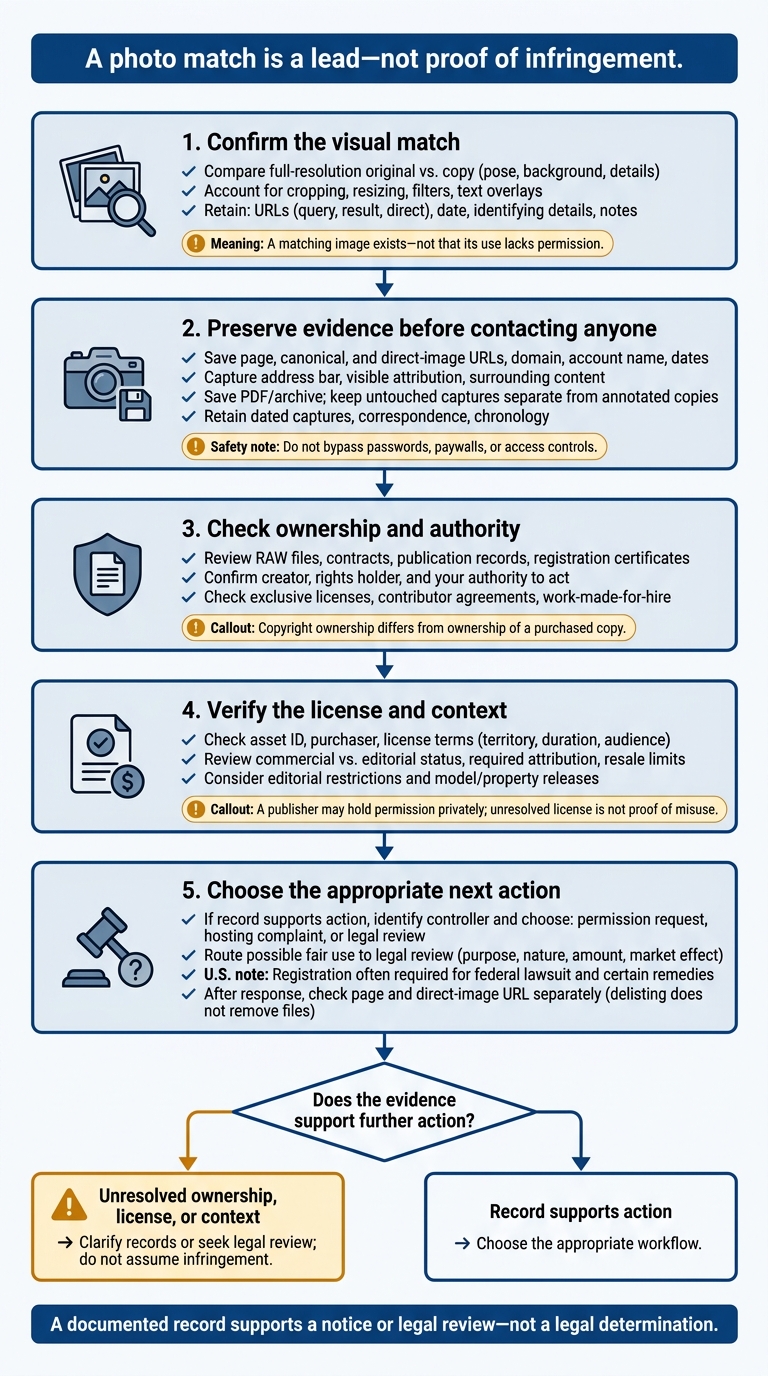
Verify Stock Photo Matches Before Taking Action
When a tool flags a possible match, verify it before escalating. Confirm it’s the same photo – not just the same subject. Compare the full-resolution original with the suspected copy. Look at pose, shadows, reflections, background details, and perspective. Account for cropping, resizing, compression, mirroring, filters, and text overlays.
| Verification stage | What to check and retain | What it shows |
|---|---|---|
| Visual matches | Identifying details, crop or edit differences, search tool, date, query image, result URL, direct image URL, and match notes | A matching or closely similar image exists – not that its use lacks permission. |
| Ownership records | RAW files, source exports, contracts, assignments, publication records, registration certificates, and agency or contributor records | Who created the work and who controls the relevant rights. |
| License verification | Asset ID, purchaser, invoice or order ID, license terms, permitted media, territory, duration, audience limits, modifications, and sublicensing terms | Whether permission covers the observed use. |
| Enforcement evidence | Page, canonical, and direct-image URLs; domain; dated captures; correspondence; and a chronology of events | A documented record for a notice or legal review – not a legal determination. |
If the match still looks valid, preserve the page before contacting anyone. Record the domain, account name, page title, publication and update dates, and discovery time with its time zone. Note whether a CDN or third-party host serves the image.
Include the address bar, visible attribution, and surrounding content in your captures. Save a PDF or archive copy where permitted. Keep untouched captures separate from annotated copies, and document how you obtained each file. Don’t bypass passwords, paywalls, access controls, or robots restrictions.
Before taking action, check ownership, your authority to act, and the license’s scope. Review assignments, exclusive licenses, contributor agreements, commission contracts, work-made-for-hire terms, and agency enforcement authority. Along with the license details in the table, check commercial versus editorial status, required attribution, resale or redistribution limits, subscription coverage at download, and permitted accounts or seats.
An unresolved license question is not proof of misuse. A publisher, client, or agency may hold permission privately. Copyright ownership also differs from ownership of a purchased copy.[10]
Review editorial restrictions and model or property releases separately from the license. Missing release information proves nothing by itself. Send possible fair use cases for legal review using the four factors: purpose, nature, amount used, and market effect. Commercial use is not automatically infringement, and nonprofit use is not automatically fair use.[13] For U.S. works, registration is generally required before filing a federal infringement lawsuit. Registration timing also affects access to certain monetary remedies.[9][12]
Search-engine delisting does not remove hosted images. After any response, check the page and direct-image URL separately. The file may still be accessible through its host, CDN, or other links.[11] If the record supports action, identify who controls the image and choose the appropriate workflow: a permission request, hosting complaint, or legal review.
Choose Tools for Search, Monitoring, or Enforcement
Use the comparison tables above to match each tool to the job. Google Lens and TinEye work for occasional spot checks, including one-off manual searches. They don’t support continuous monitoring.[1]
Choose managed enforcement if you want the vendor to handle outreach and fee recovery. Before submitting a case, confirm the commission, any added fees, and who approves settlements.[1]
For proof of creation, use ScoreDetect to timestamp your originals first and keep exportable proof with each file. Store the certificate alongside the original asset so you can refer to it when reviewing suspected misuse.
Before paying for a plan, test each tool with cropped, resized, color-shifted, and recompressed files. Check the matches manually and preserve evidence before taking action.[1]
FAQs
How often should I check my stock photos for misuse?
Replace periodic manual checks with automated monitoring software that runs in the background [1][2]. AI-based tools scan the web, social media, and marketplaces continuously and alert you when they detect use without permission [1][2].
For high-value images or portfolios where misuse is already hurting revenue, 24/7 monitoring is recommended so you can act quickly [3]. Automation means you don’t have to search for stolen work yourself [1][2].
How can I verify licenses sold through stock agencies?
Keep a centralized digital asset management system that links each image to its rights record. Include the asset ID, file hash, license type, authorized client, permitted channels, territory, duration, and exclusivity terms [1].
For suspected matches, check the time period, territory, media type, number of placements, and exclusivity. Use is licensed only when it meets every license parameter. Use outside any parameter may be unauthorized or out of scope [1].
What should I do if a suspected infringer ignores me?
If a suspected infringer ignores your first notice, escalate with your evidence package [1][2]. Include chain-of-custody records, such as blockchain-verified ownership certificates, SHA-256 checksums, and timestamped HTML snapshots [1][3][4].
Use those records to support formal DMCA takedown notices sent to the relevant hosting provider, platform, or search engine [5][2]. Log every notice, response, and removal confirmation. This audit trail can support potential legal action or claims for higher damages [5][2].