I choose enterprise DMCA tools by content type, channel coverage, human review controls, and notice tracking – not by advertised takedown rates.
I compare three workflows: search-result enforcement, managed copyright enforcement, and automated detection with notice and takedown submission. My buying test is a 30–60-day pilot that measures matching accuracy, review time, and cost per resolved case.
Quick Comparison
| Tool | Workflow to test | Checks before buying |
|---|---|---|
| InCyan Indago | Search-result enforcement | Search coverage, supported content types, reviewer controls, and delisting records |
| Corsearch Content Protection | Managed, global copyright enforcement | Matching methods, evidence records, review queues, escalation, and integrations |
| Red Points Copyright Protection | Automated detection and DMCA submission across multiple channels | Approval rules, bulk controls, counter-notices, APIs, and post-removal checks |
I treat reported success rates of 96%, 97%, and 95%, respectively, as vendor claims – not comparable test results. Before buying, I ask what each rate counts, which channels it covers, and whether restored content changes the result.
My rule: <u>a match needs legal review, and search delisting is not host-level removal</u>. I also check ownership, licenses, fair use, evidence retention, pricing limits, and who handles disputed notices.
Here’s how I assess each workflow before committing to a contract.
1. InCyan Indago
Matching and Coverage
Treat Indago as a search-result enforcement tool. Check whether Idem and Idem Text come in the same package. Ask InCyan to document which search engines, countries, languages, and content types it supports, plus how often it scans. That scope determines the evidence reviewers need before submitting a notice.
Evidence and Review
Each match record should include source and destination URLs, screenshots, the reference asset, a confidence score, and reviewer approval history.
Before bulk notice routing starts, verify confidence thresholds, reviewer permissions, side-by-side comparisons, allowlists for known partners, and controls that suppress repeat false positives. If the workflow uses invisible watermarking, confirm how it appears in the match record.
Notice Workflows and Tracking
After reviewers validate a match, it moves into the notice workflow. Check for bulk URL imports, platform-specific templates, duplicate checks, and required DMCA attestations. Also confirm whether Indago submits notices directly or prepares them for approval.
Request records that link each finding to its submission, response, rejection, counter-notice, and follow-up review. Treat the under-60-minute delisting and 96% takedown claims as vendor-reported until InCyan defines the measurement period, scope, and success criteria.
Integrations and Enterprise Fit
Indago’s clearest fit is a team focused on search-result enforcement. Confirm API access, webhooks, SSO, role-based permissions, audit exports, retention settings, regional processing, and connections to internal rights databases.
Run a pilot using representative assets and licensed assets that must not be flagged. Measure reviewer workload, false positives, submission acceptance, and resurfacing separately. Ask whether pricing is based on assets, matches, URLs, or notices.
sbb-itb-738ac1e
2. Corsearch Content Protection
Matching and Coverage
InCyan focuses on search-result enforcement. Corsearch focuses on managed, global copyright enforcement. Its Content Protection service combines managed enforcement with automated discovery across search engines, piracy sites, social platforms, marketplaces, domains, and video uploads. Its matching tools include global pre-filtering, logo detection, OCR, image classification, and matched-asset feeds.[8][10]
Confirm which methods cover text, audio, and video. Also check whether monitoring covers only public pages or extends to private groups, channels, and streaming services.
Evidence and Review
Corsearch combines automated discovery with human review to filter out decoys and results that don’t support enforcement action.[7][9] Evidence quality is a key buying test. Ask for proof of ownership and check whether evidence remains available when a page changes or disappears. Enterprise reviewers need to validate claims before submission.
Notice Workflows and Tracking
Corsearch says specialist teams select the best enforcement path for each platform, with near-real-time portal updates on activity and outcomes.[13][15] Confirm whether teams submit notices through APIs, portals, or email, and whether tracking separates acknowledged, expired, and restored cases.
Its vendor-reported 97% typical compliance rate at the end of the campaign is not an independently verified removal rate. Ask for the denominator, campaign duration, and how disputed or restored content factors into that figure.[12]
Integrations and Enterprise Fit
Corsearch suits rights holders seeking global, managed enforcement at scale. It’s an outsourced enforcement service, not a self-service notice workflow.[11][13] With this service-led model, integration and escalation design matter as much as matching accuracy.
Confirm support hours, language coverage, escalation paths, and support for connections to digital asset management (DAM), rights-management, CRM, legal-ticketing, and business-intelligence (BI) systems. Request technical documentation and an itemized proposal that separates monitoring, review, submission, escalation, reporting, and integrations.[14]
3. Red Points Copyright Protection
Matching and Coverage
Red Points automatically searches websites, marketplaces, social platforms, search engines, streaming services, apps, cyberlockers, and peer-to-peer networks. It uses image fingerprinting, computer vision, logo recognition, OCR, and machine learning to identify stolen photos, videos, written content, and logos.[16][2][3]
Confirm which channels and regions it covers, how often it crawls, and whether video and text matching are built in or require a separate service.[16][2][3] Broad coverage is only part of the picture. You’ll also need to check evidence quality and how it limits false positives.
Evidence and Review
Red Points combines AI validation, rules-based automation, and support from a human IP team. It collects screenshots, URLs, and HTML evidence.[16][2][3]
Check approval thresholds by channel, content type, seller, or confidence score. Ask about exception lists for licensees and partners, plus required human review for unclear matches. Also verify evidence timestamps, matched reference assets, export options, and how long evidence stays available after removal.[16][3][19] Once a match is validated, the next test is how fast – and how well – the team handles the case.
Notice Workflows and Tracking
After validation, Red Points prepares and submits customized DMCA notices. It can also request search-engine de-indexing, handle cases in bulk, and monitor content after removal.[3][16][21]
Ask how URLs are grouped into cases and whether customers can edit, approve, reject, or withdraw notices. Check how counter-notices are handled, too. Track detection, validation, submission, removal, de-indexing, and restoration as separate steps.
Red Points reports a 95% average success rate and a 3-hour median response time in its materials. Confirm whether these figures apply specifically to copyright cases and what “response” measures.[18]
Integrations and Enterprise Fit
Red Points reports direct API integrations with Amazon, Meta, and Google, plus more than 300 removal agreements.[16][17][19] Verify its APIs, webhooks, SSO, role-based access, and connections to DAM, CRM, ticketing, data warehouse, and legal systems. These connections can reduce manual case handling and support legal review.
Before turning on automatic notices, pilot 100–500 reference assets, including licensed content and examples with unclear matches.[16][3][19] Ask exactly what unlimited takedowns includes, such as human review, repeat submissions, and appeals.[16][3][19][20] Use these controls as checkpoints in the feature comparison below.
Feature Comparison
Claim labels a feature described by the vendor – not an independently tested result. Verify marks a check that needs documentation or a demonstration. No independent benchmark is cited here.
The tables turn the earlier vendor profiles into checks you can use during procurement.
Matching and channel coverage
| Field | InCyan Indago | Corsearch Content Protection | Red Points Copyright Protection |
|---|---|---|---|
| Matching methods | Verify: Supported formats and detection methods for your catalog. | Claim: Automated discovery and human verification. Verify: Supported formats and detection methods for your catalog. | Claim: Automated copyright detection. Verify: Supported formats and detection methods for your catalog. |
| Channel coverage | Claim: Search-engine indexed links. Verify: Other channels, regions, and crawl frequency. | Claim: Search engines, social media, source-site removal workflows, and piracy-platform intelligence.[23] | Claim: Websites, marketplaces, social platforms, search engines, and cyberlockers.[3] |
Test how each tool handles cropped, resized, compressed, re-encoded, mirrored, excerpted, or otherwise transformed assets.
Use the same test set for all three tools. Compare precision, recall, false positives, latency, and reviewer workload.
Evidence and review
Include licensed content, commentary, and news examples in your tests – not just suspected infringement.
| Field | InCyan Indago | Corsearch Content Protection | Red Points Copyright Protection |
|---|---|---|---|
| Evidence records | Verify: Match scores, hashes or fingerprints, and chain-of-custody metadata. | Verify: Available account, seller, jurisdiction, and hosting-provider details. | Verify: Available account, seller, jurisdiction, and hosting-provider details. |
| Validation | Verify: Human review responsibilities and ownership checks. | Claim: Manual and automated verification before enforcement.[23] | Claim: Automated detection and enforcement. Verify: Required human checkpoints. |
| Approval controls | Verify: Pause controls. | Verify: Escalation rules and jurisdiction-specific policies. | Verify: Escalation rules and jurisdiction-specific policies. |
For each tool, confirm that evidence records include suspected-infringement and source URLs, timestamps, screenshots or rendered captures, and matched reference assets.
Check confidence thresholds, mandatory human approval, reviewer queues, role-based permissions, dual approval, and exclusion lists for trusted licensees. Also review retention, legal holds, case exports, and reviewer audit logs.
Notice workflows and tracking
| Field | InCyan Indago | Corsearch Content Protection | Red Points Copyright Protection |
|---|---|---|---|
| Submission routes | Claim: Search-listing enforcement and de-indexing. Verify: Other notice routes. | Claim: Submission through each platform’s required method; valid power of authority required.[23] | Claim: Automated DMCA filing and tracking.[3] Verify: Available route for each channel. |
| Bulk processing | Verify: Batch sizes and authorization records. | Claim: Email submissions are capped at 20 messages per month and five links per message; service starts within eight working hours of acknowledgment.[23] | Claim: Unlimited detections and takedowns within the contract scope.[22] Verify: Batch controls and exclusions. |
| Counter-notices | Verify: Receipt and routing to counsel. | Verify: Receipt and tracking. | Claim: Pushbacks and counter-notices within the advertised scope.[22] Verify: Exact legal and operational responsibilities. |
| Outcome tracking | Verify: Separate submission, de-indexing, and restoration statuses. | Claim: Removal checks and escalation for delayed or unsuccessful action.[23] | Verify: Separate acceptance, removal, delisting, and restoration statuses. |
Across all three tools, check duplicate suppression, editable declarations, counter-notice response support, deadlines, and restoration tracking.
Search delisting does not remove the underlying file. Measure detection-to-submission time separately from submission-to-platform-action time. Keep accepted notices separate from completed removals, too.
Once you’ve checked workflow fit, compare how each platform connects to your legal, asset, and reporting systems.
Integrations and enterprise fit
| Field | InCyan Indago | Corsearch Content Protection | Red Points Copyright Protection |
|---|---|---|---|
| APIs and integrations | Verify: Bulk exports and integrations. | Verify: Standard connectors. | Claim: Direct API connections and priority escalation.[3] Verify: Customer-facing API access and connectors. |
| Operational limits | Verify: Asset, channel, notice, analyst-hour, API, and service limits. | Claim: Email-submission caps and service-start timing noted above.[23] | Claim: Unlimited detections and takedowns within the contract scope.[22] Verify: Asset, channel, geography, and service exclusions. |
| Pricing | Verify: Custom quote; no public price listed. | Verify: Custom quote; no public price listed. | Claim: Flat-fee pricing with unlimited detections and takedowns within the contract scope, without per-detection or per-takedown charges.[22] |
For each vendor, request API and webhook documentation, security controls and certifications, and data policies covering hosting, retention, deletion, subprocessors, and model-training use.
Pros, Cons, and Use Cases
These trade-offs reflect how vendors describe their workflows for matching, evidence collection, review, bulk processing, and tracking. Treat unconfirmed features as questions to resolve before buying.
| Platform | Potential advantage | Limits and workflow trade-offs | Procurement question |
|---|---|---|---|
| InCyan Indago | Its specialized search-result delisting workflow may suit teams focused on search-heavy piracy. | Delisting search results is narrower than removing content at its source. Don’t assume Indago matches images, audio, video, or text unless its product documentation confirms this. | Which content types does it match, what evidence does it collect, and which steps remain manual? |
| Corsearch Content Protection | Manual and automated verification, followed by notice submission and escalation, may help teams handle disputed or stalled cases.[23] | Vendor-managed review depends on the provider’s queues and decision rules. Clarify customer approval duties and escalation costs. | How does the provider escalate licensed uses and fair-use concerns, and what review turnaround does the contract promise? |
| Red Points Copyright Protection | Its documented visual-detection methods give image-heavy teams specific features to test: computer vision, image fingerprinting, logo recognition, and OCR.[16] | Visual-detection claims don’t prove audio support or reliable text similarity. Crawler access and transformed files may affect coverage. | Can a live demo show hard matches, rejected matches, and the full audit trail for your assets? |
Use these differences to assign ownership, costs, and review work. For managed or highly automated workflows, identify who makes each decision: the vendor, your enforcement team, or counsel. That division affects staffing costs as much as software pricing.
The matrix below pairs enforcement needs with the narrowest workflow that can do the job.
| Scenario | Selection priority | Evidence needed before purchase |
|---|---|---|
| Search-heavy piracy | Search-engine depth, URL-level evidence, repeat-offender suppression, and fast routing from review to notice. | Test target-channel and regional coverage, detection rates, and time to notice. |
| Image reuse | Perceptual matching for crops, resizing, compression, and edits. | Check whether results distinguish exact copies from visually similar or licensed images. |
| Video and audio libraries | Fingerprinting, segment matching, and transformed-file detection. | Test clips, remixes, background audio, subtitles, muted videos, and incomplete uploads. |
| Text publishing | Exact and near-duplicate matching, with context for review. | Test quotations, fair use, syndication, translation, public-domain text, and search-result snippets. |
| High-volume enforcement | Bulk review, templates, deduplication, APIs, role-based approvals, retries, and status reporting. | Measure analyst workload, notice quality, throttling, queue latency, and handling of rejected or duplicate notices. |
| High-risk legal settings | Mandatory human approval, ownership records, evidence preservation, audit logs, legal holds, counter-notice workflows, and automation limits. | Verify records of the reviewer, basis, authority, timestamp, evidence, and decision. Test whether automation can be disabled by source or risk category. |
Broad discovery, fast notices, and vendor-reported success rates don’t establish accuracy or fit. Before using performance metrics to make a purchasing decision, request the denominator, reporting period, exclusions, and channel breakdown.
Once you’ve checked use case fit, test whether the workflow can stop uncertain cases before submission.
Bulk enforcement needs a legal stop: hold uncertain cases, fix metadata, and block repeat submissions after rejection or a counter-notice. These controls help reduce false claims and misrepresentation exposure.[5][6][24][25]
Buying Checklist and Recommendations
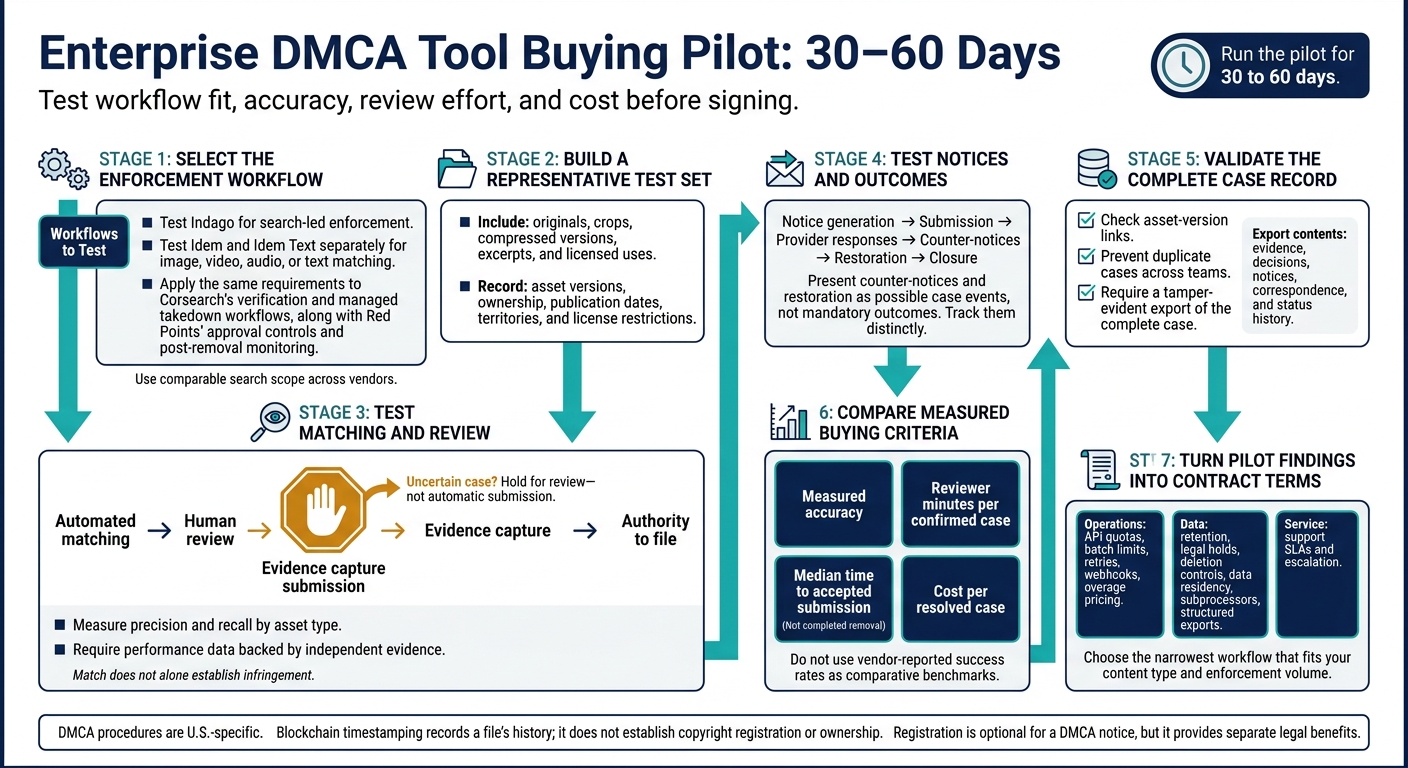
Enterprise DMCA Tool Buying Pilot: 30–60 Days
Use the comparison above to plan a controlled pilot, then turn the results into contract terms. Run the pilot for 30 to 60 days, with comparable search scope across vendors. Include originals, crops, compressed versions, excerpts, and licensed uses. Record asset versions, ownership, publication dates, territories, and license restrictions.
Measure precision and recall by asset type, and require performance data backed by independent evidence. Test the full process: automated matching, human review, evidence capture, authority to file, notice generation, submission, provider responses, counter-notices, restoration, and closure. Check asset-version links and whether the system prevents duplicate cases across teams. Require a tamper-evident export of the complete case, including evidence, decisions, notices, correspondence, and status history.
Put service and data terms in the contract: API quotas, batch limits, retries, webhooks, overage pricing, retention, legal holds, deletion controls, data residency, subprocessors, structured exports, support SLAs, and escalation.
Match the workflow to your enforcement path, and test only the tools that fit. Test Indago for search-led enforcement. Test Idem and Idem Text separately for image, video, audio, or text matching. Apply the same requirements to Corsearch’s verification and managed takedown workflows[1], along with Red Points’ approval controls[26] and post-removal monitoring[4].
Choose the narrowest workflow that fits your content type and enforcement volume. Base that choice on measured accuracy, reviewer minutes per confirmed case, median time to accepted submission, and cost per resolved case.
Before buying, keep one legal distinction in mind: DMCA procedures are U.S.-specific. Blockchain timestamping records a file’s history; it does not establish copyright registration or ownership. Registration is optional for a DMCA notice, but it provides separate legal benefits.[27][28][29]
FAQs
When is automated DMCA filing too risky?
Automated DMCA filing is too risky without human review when content may fall under fair use, be licensed, or be syndicated [1][2]. Matching systems often miss context, which can lead to incorrect claims, strained partner relationships, and counterclaims [1][2].
Before submitting a notice, use a two-step human review process to verify the original asset, why the system flagged the match, and the context of its use [3][1]. Always check matches against internal rights records to confirm the use isn’t permitted [1].
What should we do if content returns after removal?
Keep checking for re-uploads and repeat infringements. Log every notice, response, and removal confirmation in your platform to maintain an audit trail. Compare re-uploaded copies with your original assets and rights records, then follow your established escalation process.
Make sure your contracts address repeat infringements and monitoring. Use exportable reports to separate initial notices from follow-up actions and document persistent offenders for possible legal action or claims for higher damages.
How can we calculate our total enforcement costs?
Request custom vendor pricing for your deployment. Pricing for a full configuration generally isn’t publicly available [1]. Before budgeting, label each claim as documented, vendor-stated, or unverified [2].
Run a controlled pilot using representative high-value assets to test channels, modules, and enforcement responsibilities [1][2]. Track detection coverage, time to removal, and repeat-infringer rates to assess ROI [2][3]. Use business intelligence tools to combine results and report enforcement ROI in U.S. dollars (USD) [3].