Multimodal workflow containers are vital for running AI systems that handle text, images, audio, and video efficiently. Poorly designed containers can lead to slow performance, high costs, and system failures. This guide explains how to build and manage these containers effectively to save time, reduce expenses, and improve reliability.
Key Takeaways:
- Keep containers small and reproducible: Use slim base images, multi-stage builds, and externalize model weights to reduce image sizes (from 15–30 GB to 2–4 GB).
- Separate workflow stages: Break pipelines into individual containers for tasks like preprocessing, inference, and data handling. This allows for independent scaling and reduces failures.
- Optimize storage: Use S3-compatible storage for model weights and metadata tagging for faster retrieval. Semantic caching can cut redundant processing by up to 90%.
- Governance and traceability: Version each component independently, track lineage, and use reproducible workflows to ensure reliability and compliance.
By following these practices, you can cut infrastructure costs by 40–60%, speed up deployment times, and make your AI systems more efficient and easier to manage.
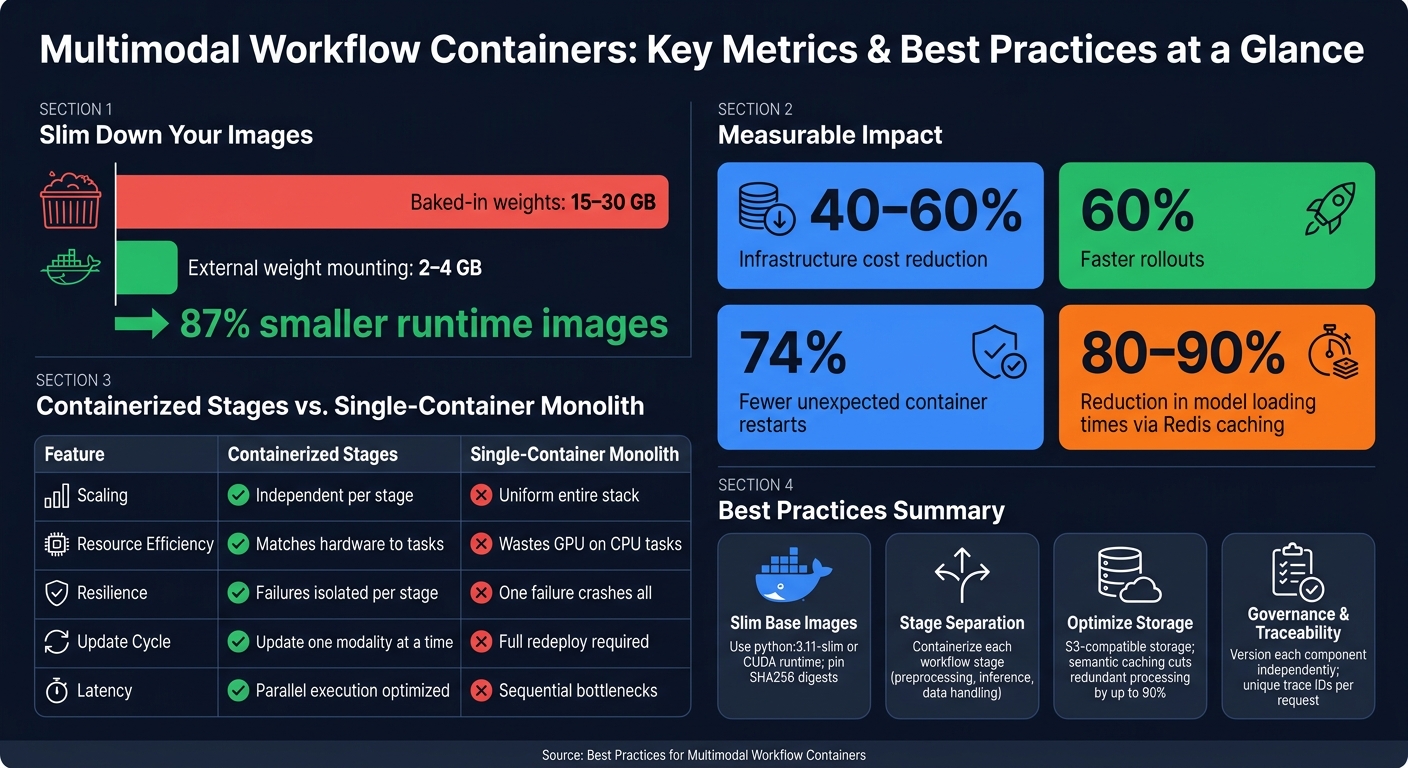
Multimodal Workflow Containers: Key Metrics & Best Practices at a Glance
Multimodal data: Architecting pipelines that don’t break at scale
sbb-itb-738ac1e
Build Minimal and Reproducible Container Images
Keeping container images lean is essential for efficient multimodal workflows. A typical setup with PyTorch, Transformers, and LangChain on a standard Python base image can quickly balloon to over 5 GB. Add model weights, and you’re looking at 15–30 GB. This leads to sluggish pulls, slow cold starts, and frustrating delays during auto-scaling.
The solution? Keep your images small, stateless, and reproducible. Start by selecting the right base image.
Choose Slim Base Images
The base image you choose sets the tone for your container’s efficiency. Go for lightweight options that meet your runtime needs without unnecessary extras. Examples include:
python:3.11-slim: A minimal Python image.nvidia/cuda:12.4.1-runtime-ubuntu22.04: Ideal for CUDA-based workflows, stripped of extra build tools.- Distroless images: For high-security environments, options like
gcr.io/distroless/staticremove even the shell, reducing the attack surface significantly.
Another key practice is digest pinning. Instead of relying on mutable tags like :latest, use a specific SHA256 digest. This guarantees that the same image is pulled every time, avoiding surprises caused by tag mutations.
"Pinning Docker image digests reduced unexpected container restarts by 74% in our production environment – the main culprit had been Docker Hub tag mutation pushing a new CUDA version under the same tag." – Markaicode [8]
Once your base image is set, focus on including only what’s essential for runtime.
Install Only Runtime Dependencies
Streamline your build process using multi-stage builds. Use a "builder" stage for compiling C++ extensions, CUDA drivers, or other heavy dependencies. Then, transfer only the necessary artifacts to a slim runtime image. This keeps build tools out of production.
For Python packages, run pip install --no-cache-dir to avoid caching unnecessary files. Clean up apt caches immediately with rm -rf /var/lib/apt/lists/*. To further reduce bloat, use a .dockerignore file to exclude items like git history, local virtual environments, and source files from the build context.
Avoid embedding model weights directly into the image. Instead, mount them at runtime using ReadOnlyMany PersistentVolumeClaims or S3 FUSE. This approach shrinks your container size from 15–30 GB to just 2–4 GB, enabling faster version updates without requiring a full redeploy.
"Statelessness is non-negotiable – every container must be disposable. Mount model weights via ReadOnlyMany PersistentVolumeClaims or S3 FUSE – never bake them into the image." – Markaicode [8]
Here’s how baked-in weights compare to external mounting:
| Approach | Image Size | Cold Start | Version Swapping | Storage Cost |
|---|---|---|---|---|
| Baked-in weights | 15–30 GB+ | Slow | Requires full redeploy | High (duplicated in registry) |
| External weight mounting | 2–4 GB | Fast | Rapid model swapping | Low (stored once in volume/S3) |
Adopting these practices leads to faster rollouts and lower costs. Teams that prioritize optimized container deployment often achieve 60% faster rollouts and cut cloud expenses by up to 30% [3].
Separate Workflow Stages for Scalability
Once your container images are streamlined, the next step is structuring your pipeline effectively. Segmenting the workflow allows for better resource allocation and easier debugging. If you treat data ingestion, preprocessing, and model inference as a single unit, you end up with a rigid system that’s tough to scale and even harder to troubleshoot. The solution? Break each stage into its own container.
"Multi-modal pipelines become unmanageable when every stage shares the same runtime assumptions." – GMI Cloud [1]
Containerize Each Workflow Stage
Each stage in your workflow has unique hardware requirements. For instance, vision models need high VRAM and fast memory bandwidth. Audio pipelines, on the other hand, are sensitive to latency but don’t demand as much memory. Text generation falls somewhere in the middle. If you cram all these stages into a single container, you’re forced to allocate resources for the most demanding component, leading to wasted capacity everywhere else.
By separating each stage into its own container, you unlock the ability to run them in parallel. This reduces latency and makes it easier to update individual components without disrupting the entire system. This approach is particularly important for multimodal inference, which can use 3x to 10x more GPU memory than text-only models [4]. Thoughtful stage separation helps keep costs in check while ensuring smooth operation.
Once you isolate the stages, scaling them independently becomes much simpler.
Scale Each Stage Independently
"Uniformly scaling a multimodal pipeline is inefficient." – GMI Cloud [1]
When there’s a surge in image uploads, you want to scale your vision encoders, not waste resources spinning up extra text generation capacity. Isolating stages makes this possible. Tools like KEDA allow you to scale each stage based on real-time demand, ensuring resources are used efficiently [4].
The financial benefits of this approach are significant. Using spot instances for burst capacity can slash infrastructure costs by 40% to 60% compared to scaling the entire pipeline uniformly [4]. For context, running a single A100 GPU node on AWS at on-demand pricing costs around $25,000 to $30,000 per month. Spot instances can reduce this by 60% to 80% for workloads that aren’t time-critical [4].
Here’s a comparison of containerized stages versus a monolithic deployment:
| Feature | Containerized Stages | Single-Container Monolith |
|---|---|---|
| Scaling | Independent per stage based on demand | Uniform scaling of the entire stack |
| Resource Efficiency | Matches hardware to specific tasks | Wastes GPU resources on CPU tasks |
| Resilience | Failures are isolated to specific stages | One failure can crash the entire pipeline |
| Update Cycle | Update one modality at a time | Requires redeploying the entire system |
| Latency | Optimized with parallel execution | Sequential bottlenecks are common |
Keep in mind that GPU pods take 45–90 seconds to warm up. Setting proactive thresholds ensures users don’t experience noticeable delays.
Optimize Storage and Retrieval
After designing efficient containers and implementing scalable stage separation, managing storage effectively becomes critical for maintaining system performance. Multimodal workflows generate massive amounts of data – think high-resolution images, videos, audio, and model outputs. How you store and retrieve this data impacts both costs and speed, making efficient storage solutions a priority.
Use Cloud Object Storage
Using S3-compatible object storage for model weights – whether it’s AWS S3, a cloud-native bucket, or a self-hosted solution like MinIO – can significantly reduce cold start times and improve deployment reliability [6][7]. Keeping container images below 2 GB ensures your infrastructure can handle traffic spikes in seconds instead of minutes [6]. MinIO stands out because it serves as a private, S3-compatible storage option that integrates seamlessly with tools like MLflow and most AI frameworks [7].
One important consideration is egress fees. Transferring large datasets between storage and compute can sometimes cost more than GPU usage itself. To manage this, choose storage providers that minimize data movement costs and design your system so storage scales independently of GPU compute [6][2].
"The cheapest inference incident is the one your gateway rejects before it reaches the GPU. Put cost guardrails at the edge, not just in the billing dashboard." – NumberOne.cloud [9]
Apply Hybrid Search for Indexed Data
Once your data is stored, retrieval efficiency becomes the next challenge. Hybrid search, which combines vector search with metadata filtering, is an effective way to scale retrieval [2][9]. Vector search identifies assets based on meaning, while metadata filtering uses structured attributes to narrow down results early in the process. This approach significantly reduces GPU load by filtering out irrelevant data before it reaches expensive inference stages.
| Search Component | Function | Efficiency Benefit |
|---|---|---|
| Vector Search | Finds semantically similar assets | Enables retrieval based on meaning, not just keywords [2] |
| Metadata Filtering | Narrows results using structured attributes | Reduces GPU load by eliminating irrelevant data early [9] |
| Semantic Caching | Stores results of similar past queries | Avoids redundant inference, cutting costs and latency [2] |
| Semantic Routing | Directs inputs to the appropriate model | Optimizes resource allocation for specific tasks [3] |
Semantic caching deserves special attention. If your pipeline frequently encounters similar prompts or image frames, a cache hit can bypass the need to re-run the entire inference process. For example, Redis caching can reduce model loading times by 80% to 90% [7]. To avoid serving outdated results after a model update, make sure your cache keys include normalized content hashes, model versions, and policy versions [2].
Finally, tag your assets with detailed metadata – such as source device, codec, resolution, and sensitivity class – right at the point of ingestion, utilizing secure file timestamping to ensure data integrity. This eliminates the need for downstream systems to repeatedly parse data and speeds up retrieval dramatically [2]. By optimizing retrieval through hybrid search, you ensure a seamless flow of data into governance and traceability processes.
Governance and Traceability in Multimodal Workflows
Once you’ve optimized your storage and retrieval systems, the next hurdle is ensuring you can track exactly what processes ran, when they ran, and why. With storage and retrieval sorted, governance and traceability become crucial for diagnosing issues and maintaining control. In multimodal workflows, a single inference request might pass through a vision model, an audio transcription service, and a text reasoning layer – all in sequence. Without proper governance, tracing unexpected outputs back to their source can feel like finding a needle in a haystack.
"A model without governance is just a drift-prone artifact waiting to become a production incident." – NumberOne Cloud [9]
Track Versions Across Components
One common mistake is treating the entire pipeline as a single versioned entity. Instead, version each stage – whether it’s vision, audio, or text – independently. This approach allows you to update individual components without disrupting the entire workflow and minimizes risks during incremental rollouts like canary deployments [1].
To maintain consistent versioning, use fixed image digests and verified container pulls. These practices ensure every container’s version history is clear and traceable. For model artifacts, rely on a centralized registry like MLflow paired with S3-compatible storage. This setup lets you track version history (e.g., v1.0.0 → v1.0.1) alongside metadata and lineage [7].
Every request log should include a unique trace ID that spans all stages (e.g., ASR, OCR, reasoning). Add metadata such as confidence scores and the specific versions of models and prompts used. This level of logging makes it possible to reconstruct the entire inference process with precision [2][5].
By implementing this detailed version tracking, you can ensure that updates to your workflow are reproducible and testable before they go live.
Keep Workflows Reproducible
Reproducibility goes hand-in-hand with version tracking, helping to prevent production issues and maintain a solid audit trail. One best practice is to keep model weights separate from container images. Instead, mount them at runtime using methods like ReadOnlyMany PersistentVolumeClaims (PVCs) or S3 FUSE. This approach turns model updates into simple configuration changes, avoiding the need for a full container rebuild [8].
Before rolling out any new model version, test it using a fixed "replay set" – a diverse collection of multimodal inputs that represent real-world scenarios. Run this set through both the old and new versions to compare outputs and latency, catching regressions before they hit production [2][5]. Pair this with GitOps-based configuration management tools like Flux or Argo CD to ensure the pipeline’s active state always matches what’s committed in your version-controlled configurations [7].
| Governance Component | Implementation Strategy | Audit Benefit |
|---|---|---|
| Container Images | Pin to SHA256 digests | Prevents tag changes and ensures consistent environments [8] |
| Model Weights | Use encrypted object storage and artifact signing | Protects intellectual property and guarantees artifact integrity [9] |
| Data Lineage | Tag metadata (e.g., source, consent, date) | Supports compliance checks and data deletion requests [9] |
| Workflows | Manage with Infrastructure as Code (Terraform/Ansible) | Enables reproducible deployments and simplifies disaster recovery [7] |
Key Takeaways for Multimodal Workflow Containers
Think of each pipeline stage as a standalone, measurable unit. By containerizing each modality individually, you can scale based on specific metrics like VRAM usage or queue depth and cache intermediate artifacts (like embeddings) instead of just final outputs. This approach can dramatically boost performance. For instance, organizations that combine these strategies with spot instances and mixed node pools have reported cutting infrastructure costs by 40–60% [4].
This method not only improves performance but also builds a more resilient and flexible infrastructure.
"The winning teams do not chase the lowest latency or the lowest cost in isolation. They build a pipeline that is predictable enough to trust, flexible enough to evolve, and instrumented enough to improve continuously." – NewData Cloud [2]
Separating pipeline stages adds resilience. If one stage fails, the others can keep running – a concept known as graceful degradation. Achieving this requires components to remain loosely coupled. By pairing this approach with pinned SHA256 image digests and versioning each stage, you can significantly reduce the risk of silent failures. In fact, this method has been shown to cut unexpected container restarts by 74% [8].
Cost efficiency also depends on managing image sizes. Multimodal containers can easily grow to 15–30 GB, but using multi-stage builds and externalizing model weights can shrink runtime images to 2–4 GB. This reduction has a major impact on cold start times. For GPU workloads, tools like NVIDIA Triton can handle 2–3x more concurrent requests compared to raw PyTorch serving, all while using the same GPU allocation [4]. This is a straightforward improvement that doesn’t require additional hardware.
The takeaway here is simple: measure performance at the stage level, scale only what’s necessary, and ensure your configurations are version-controlled and reproducible. These practices are essential for creating a reliable and scalable multimodal system.
FAQs
How can I externalize model weights without slowing down inference?
To keep model weights separate from the container image without slowing down inference, you can store them in a persistent volume or fetch them from object storage during runtime. This approach trims the container size to around 2–4 GB, speeds up deployment, and makes it easier to update model versions without needing to redeploy the container.
If you’re working with Docker, be sure to allocate enough shared memory. Insufficient shared memory can lead to crashes during tensor operations, which can disrupt your workflow.
For verifying ownership, you might explore ScoreDetect’s blockchain timestamping as a solution. This method helps establish proof of ownership securely and efficiently.
What’s the best way to pass data between pipeline stage containers?
To streamline data transfer between pipeline stage containers, aim to reduce unnecessary data movement. One effective approach is to place stages that handle large artifacts close to each other. This helps minimize latency and avoids potential I/O bottlenecks. Leveraging shared memory or high-bandwidth interconnects can further optimize performance.
Additionally, it’s important to define explicit execution graphs, where each stage operates as an independent, scalable service. For larger workflows, consider using message buses or object stores for data transfer. Always ensure that metadata travels alongside the data to preserve lineage and enable proper auditing.
Which metrics should trigger autoscaling for each multimodal stage?
To scale multimodal workflow containers efficiently, it’s crucial to concentrate on metrics tailored to each modality rather than relying solely on general CPU and memory usage. Important metrics to monitor include GPU utilization (both core usage and VRAM consumption), inference queue depth, and latency distributions – specifically at the p95 and p99 thresholds – to identify and prevent bottlenecks. For event-driven scaling, tools such as KEDA can initiate actions based on the length of message queues. Solutions like InCyan’s Idem are designed to improve accuracy when handling complex, transformed assets.