I recommend photo-matching software that detects crops, resizing, and color edits, with scheduled monitoring for regular checks or on-demand search for occasional checks, plus source URLs and records for manual review.
I compare InCyan Idem with ScoreDetect, Pixsy, TinEye, and ImageRights on edited-copy detection, web coverage, review tools, and U.S. pricing. My starting rule: test each option with the same photos and edited versions before paying – a large search index does not guarantee better matches.
Quick Comparison
| Tool | Main use | What I’d check before buying |
|---|---|---|
| InCyan Idem + ScoreDetect | Matching across media, plus blockchain-based timestamps | Detection coverage and separate service costs; ScoreDetect Pro is listed at $12/month |
| Pixsy | Photo monitoring and recovery support | Edited-copy results, scan limits, and recovery commission; the free tier covers 500 images |
| TinEye | On-demand reverse search and API searches | Search volume and commercial terms; listed API bundles start at $200 for 5,000 searches |
| ImageRights | Monitoring and claims handling | Match quality, subscription limits, and legal-service fees |
I treat every match as <u>a lead, not proof of infringement</u>: check ownership, licenses, and fair use before taking action. Next, I look at which workflow fits your collection and what each service lets you save for review.
1. InCyan Idem and ScoreDetect
Altered-copy detection
This test checks whether the system finds altered copies after common edits. Idem handles matching; ScoreDetect handles proof and workflow. Idem matches assets against a multimodal database. InCyan says it can handle cropping, compression, and mobile-app edits – even when little of the original remains visible.
Treat vendor percentage claims as unverified until your own tests confirm them. Use files from your collection: cropped, resized, recolored, filtered, compressed, screenshots, and partially obscured versions. Log matches, misses, false positives, and response times.
Web coverage and monitoring
Matching ability doesn’t tell you how much of the web Idem searches. Ask InCyan for a written list of covered sites, platforms, marketplaces, and index sources. Also check whether monitoring runs continuously or on a schedule. You need that coverage detail to compare review depth and cost.
Match review and evidence
Ask for a demo of the review screen and export options before using matches as evidence. Check whether exports retain the matched image, source URL, and capture date so you can review them alongside your original and licensing records.
ScoreDetect certificates authenticate digital images by storing a SHA-256 checksum and timestamp – not the file itself.
Pricing and enforcement
ScoreDetect Pro costs $12/month, or $11.31/month billed annually, and includes 100 new certificates per month. The materials also describe unlimited protected content and unlimited revision history. Confirm those terms at checkout, especially whether revisions count against the certificate allowance.
Get separate quotes for monitoring, watermarking, and enforcement. If you find unauthorized matches, follow a copyright notice and takedown guide to remove them. Pro pricing doesn’t tell you what those services cost. Takedown or protection-bypass claims also don’t measure altered-image detection. Ask for the measurement period, sample size, and exclusions.
For each tool, use the same test files and ask the same coverage questions.
sbb-itb-738ac1e
2. Pixsy
Altered-copy detection
Pixsy uses digital fingerprinting and perceptual hashing to find copies that have been cropped, resized, recolored, compressed, filtered, or re-encoded.[1]
Web coverage and monitoring
Upload your originals to monitor them and receive match alerts. Pixsy reports coverage across 30+ billion web sources, but its scans don’t reach private forums, encrypted messaging apps, Discord servers, or dark web forums.[1]
Match review and evidence
A visual match is a lead, not proof of misuse. Alerts flag matching images, while review tools use metadata and context to help distinguish licensed uses from copies used without permission. Check each result against your licensing records: Pixsy cannot decide fair use.[1]
Pricing and enforcement
Pixsy’s free tier monitors up to 500 images. Paid plans offer faster scans and higher image limits. It also offers commission-based legal recovery with no upfront cost.[1]
Next, compare Pixsy’s monitoring-first approach with TinEye’s search-based model.
How to detect online photo infringement with TinEye
3. TinEye
TinEye suits rights holders who need on-demand searches, rather than continuous monitoring.
Altered-copy detection
TinEye uses content fingerprinting to find copies that have been resized, cropped, color-altered, filtered, or edited.[1]
Web coverage and monitoring
TinEye’s public reverse search is manual: you search one image at a time. Its API automates large-scale searches across billions of indexed images. Private-corpus matching limits searches to your protected originals.[1]
Coverage tells you where TinEye searches. Reviewing matches tells you whether you can use the results.
Match review and evidence
Before filing a notice, save the original file, the matching image, the page URL, and a screenshot.[1]
Pricing and enforcement
The 2026 API bundles below expire after two years.[1]
| API searches | Bundle price | Cost per search |
|---|---|---|
| 5,000 | $200 | $0.04 |
| 10,000 | $300 | $0.03 |
| 50,000 | $1,000 | $0.02 |
| 1,000,000 | $10,000 | $0.01 |
Choose a bundle based on how many searches you expect to run within two years – not just how many images you own. Finding a copy doesn’t remove it. You’ll need to file a DMCA notice or platform report separately.
Next, compare this search-first model with ImageRights’ review and enforcement workflow.
4. ImageRights
ImageRights focuses on monitoring and case handling rather than one-off searches. It’s a better fit for rights holders who want alerts and follow-through, not just search results.
Altered-copy detection
ImageRights uses AI fingerprinting to find cropped, resized, recolored, filtered, and re-encoded copies.[1] This helps find edits that exact-match searches miss. Test partially obscured copies before relying on its detection.
Web coverage and monitoring
ImageRights continuously scans 30+ billion web sources and flags likely matches for review.[1]
Before treating an alert as evidence, check the matched image, source URL, and capture date. Confirm pricing, monitoring limits, and enforcement fees before signing up.
Compare Detection, Coverage, Review, and Costs
Now that you’ve looked at each tool, compare them using the same test set. Keep detection and coverage separate: a missed match could mean the tool can’t recognize an edit – or that it never indexed the page.[1] Without a shared accuracy benchmark, there’s no basis for ranking one tool as the most accurate.
| Tool | Purpose and collection fit | Crops, resizing, colors, filters, and occlusion | Coverage and automation | Review, records, and enforcement | Pricing model |
|---|---|---|---|---|---|
| InCyan Idem | Multimodal matching for images, video, and audio | Documented support for mobile edits, cropping, and compression; color, filter, and occlusion performance isn’t measured here | Confirm coverage and automation scope directly | Confirm review and enforcement workflow | Request current terms |
| Pixsy | Continuous monitoring with recovery support | Cropping, resizing, and color changes are reported; filter and occlusion performance isn’t measured here | Vendor-reported continuous monitoring across more than 30 billion sources[1] | Alerts and commission-based recovery; confirm exports and case eligibility | Free tier, paid monitoring tiers, and recovery commission |
| TinEye | Manual reverse-image search | Visual matching is reported; no edit-specific benchmark is provided | Billions of indexed images; manual, one-at-a-time searches[1] | DIY review; no built-in enforcement | Free or low-cost searching; confirm commercial usage terms |
| ImageRights | Fit for this collection isn’t established here | No additional edit-specific benchmark supplied | No independently comparable coverage measure supplied | Confirm review workflow, exports, and enforcement terms | Confirm subscription limits and enforcement fees |
“Not measured here”
This means no measured result is provided – not that the feature is absent.
Treat the table as a starting point, then test performance with your own files. Give each tool the same set of photos you own, along with versions that include crops, size changes, color edits, filters, compression, and re-encodes. Log matches, misses, false positives, duplicates, and review time. Record coverage misses separately.
Save the matched image, page URL, capture date, and your licensing records.
Compare annual costs using the same collection size. Before buying, request written terms covering image limits, renewal pricing, export access, enforcement charges, and extra fees. Use those terms alongside your test results to narrow the shortlist.
Pros, Cons, and Collection Fit
Collection fit depends on workflow, not collection size. Enterprise matching, monitoring, and claims handling address different needs.
Match each tool to how you manage your collection – and what you need to do after finding a modified copy.
| Tool | Main advantage | Main limit | Best-fit collection | Purchasing caveat |
|---|---|---|---|---|
| InCyan Idem | Enterprise matching across images, video, and audio | A match does not establish whether the use was permitted | Enterprise archives needing multimodal matching | Ask which discovery, review, and rights-management services are included. |
| Pixsy | Photographer-focused monitoring with commission-based recovery | Heavily transformed images can be harder to identify | Professional portfolios needing regular monitoring and recovery support | Check the recovery commission and how declined claims are handled. |
| TinEye | Reverse search and API-driven workflows | Finding a match does not start enforcement | Occasional searches or collections managed through a custom API workflow | Confirm per-query charges and estimate repeat-search volume before using the API. |
| ImageRights | A search-to-claims workflow | Claims handling can add service costs and administrative work | Professional portfolios needing claims support | Clarify legal-service fees, claim eligibility, and approval requirements. |
Narrow your shortlist using these workflow differences before reviewing matches. Then check how each option handles match review, exports, and evidence capture.
Choosing a Tool and Reviewing Matches
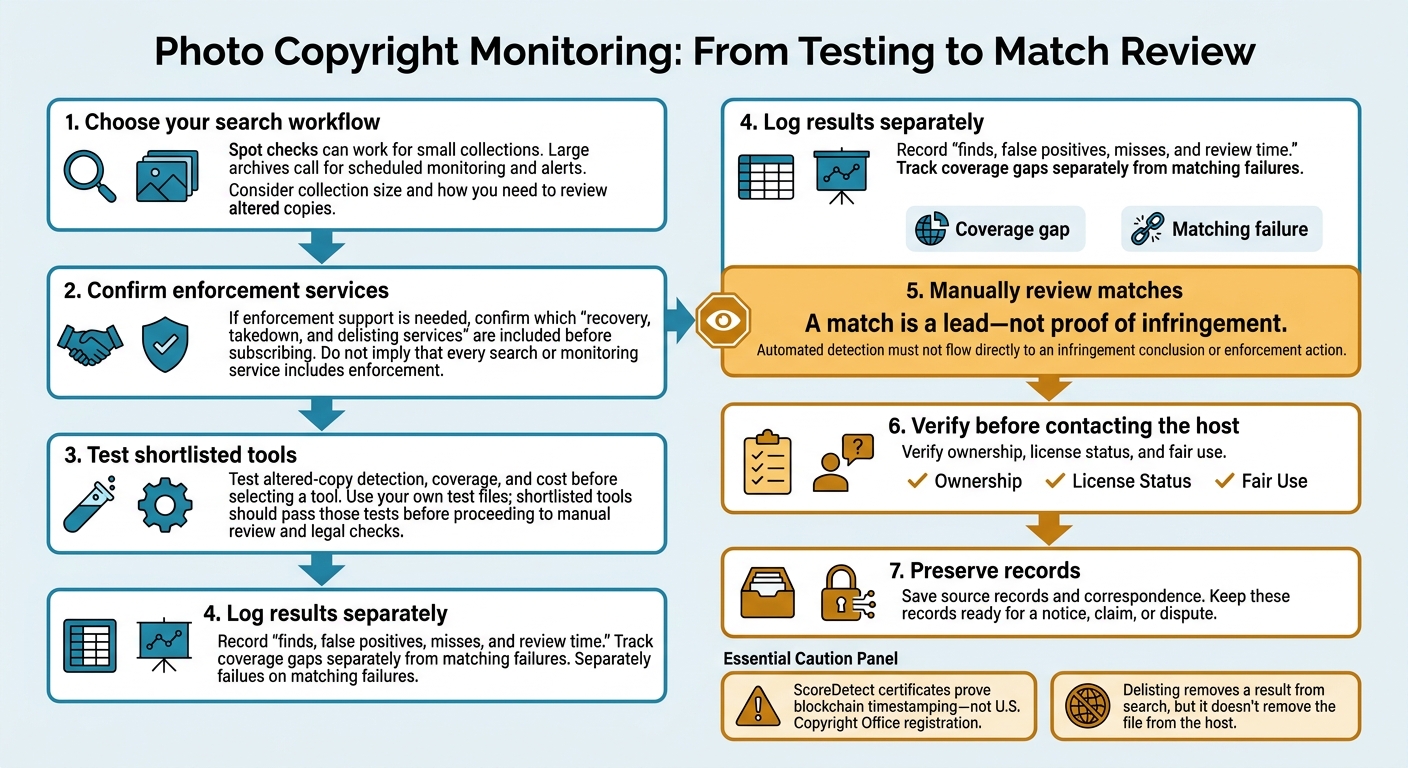
Photo Copyright Monitoring: From Testing to Match Review
After comparing detection, coverage, and cost, choose a workflow that fits your collection size and how you need to review altered copies. Spot checks can work for small collections. Large archives call for scheduled monitoring and alerts. If you need enforcement support, confirm which recovery, takedown, and delisting services are included before subscribing.
Score your test results by logging finds, false positives, misses, and review time. Track coverage gaps separately from matching failures.[1] Once your shortlisted tools pass your test files, move to manual review and legal checks.
Before contacting the host, verify ownership, license status, and fair use.[1]
Save source records and correspondence. ScoreDetect certificates prove blockchain timestamping – not U.S. Copyright Office registration. Delisting removes a result from search, but it doesn’t remove the file from the host.[1] Keep these records ready for a notice, claim, or dispute.
FAQs
How can I tell a detection failure from a coverage gap?
A detection failure happens when software scans a location but misses a copy that’s there. A coverage gap means the software doesn’t monitor the platform, domain, or gated page where the copy appears.
Test your own images – including cropped, filtered, and recompressed versions – across high-value channels. Compare missed matches with your records to check whether the software scanned the location but didn’t recognize the image.
What evidence should I preserve before an altered copy disappears?
Save the page address, a timestamped full-page screenshot or HTML snapshot, and the hosting provider’s details. Keep your original file, internal asset ID, and any blockchain-verified ownership certificates or SHA-256 checksums. If available, include invisible watermark detection results to link the copy to your original.
Maintain a chain-of-custody log that records who collected the evidence, when they collected it, and where it’s stored. This record helps support your ownership and infringement claims.
How can ScoreDetect timestamps support a copyright claim?
ScoreDetect timestamps create a tamper-proof, blockchain-anchored record showing when a specific file existed in a particular form [1][2][3]. A SHA-256 checksum helps show that you possessed the file before an infringing copy appeared – even if cropping or other edits removed its metadata [1][3][4].
These certificates provide evidence of ownership priority in legal disputes and settlement negotiations. But they do not replace formal U.S. Copyright Office registration [1][4][5][6].