If you manage a large media library, keyword search is not enough. I’d use multimodal matching to find edited, cropped, compressed, or re-uploaded assets across image, video, audio, and text – while keeping search latency near 76 ms, ingestion near 19,400 videos per hour, and recall around 96.7%.
Here’s the short version:
- I turn each media type into shared embeddings so the system matches the asset itself, not just tags.
- I split long video into 5- to 15-second segments to improve retrieval and review.
- I store vectors with rights, source, and model metadata so matches can support review and takedown steps, often leveraging blockchain-based timestamps for content security.
- I use HNSW + Faiss + cosine similarity for large-scale search.
- I set confidence bands so high-score matches can move forward, while edge cases go to human review.
- I mix batch and real-time pipelines to handle backfills and new uploads at the same time.
- I watch p95 latency, queue depth, failure rate, and model-version drift to keep the system stable.
- I keep costs in check by choosing vector size carefully: 1,024 dimensions is often a better storage/performance balance than 3,072.
- I connect matching with timestamped ownership records so search results can support enforcement.
This comes down to one idea: matching at scale only works when retrieval, metadata, thresholds, infrastructure, and ownership records all work together.
A quick look at the main numbers:
| Area | Benchmark |
|---|---|
| Recall success rate | 96.7% |
| Top-2 precision | 73.3% |
| Semantic search latency | ~76 ms |
| Ingestion throughput | ~19,400 videos/hour |
| Video batch inference cost | $0.00056 per second |
What I take from this is simple: if you want media matching that holds up under heavy volume, you need a clean embedding pipeline, a search stack built for low latency, and audit-friendly records from the start.
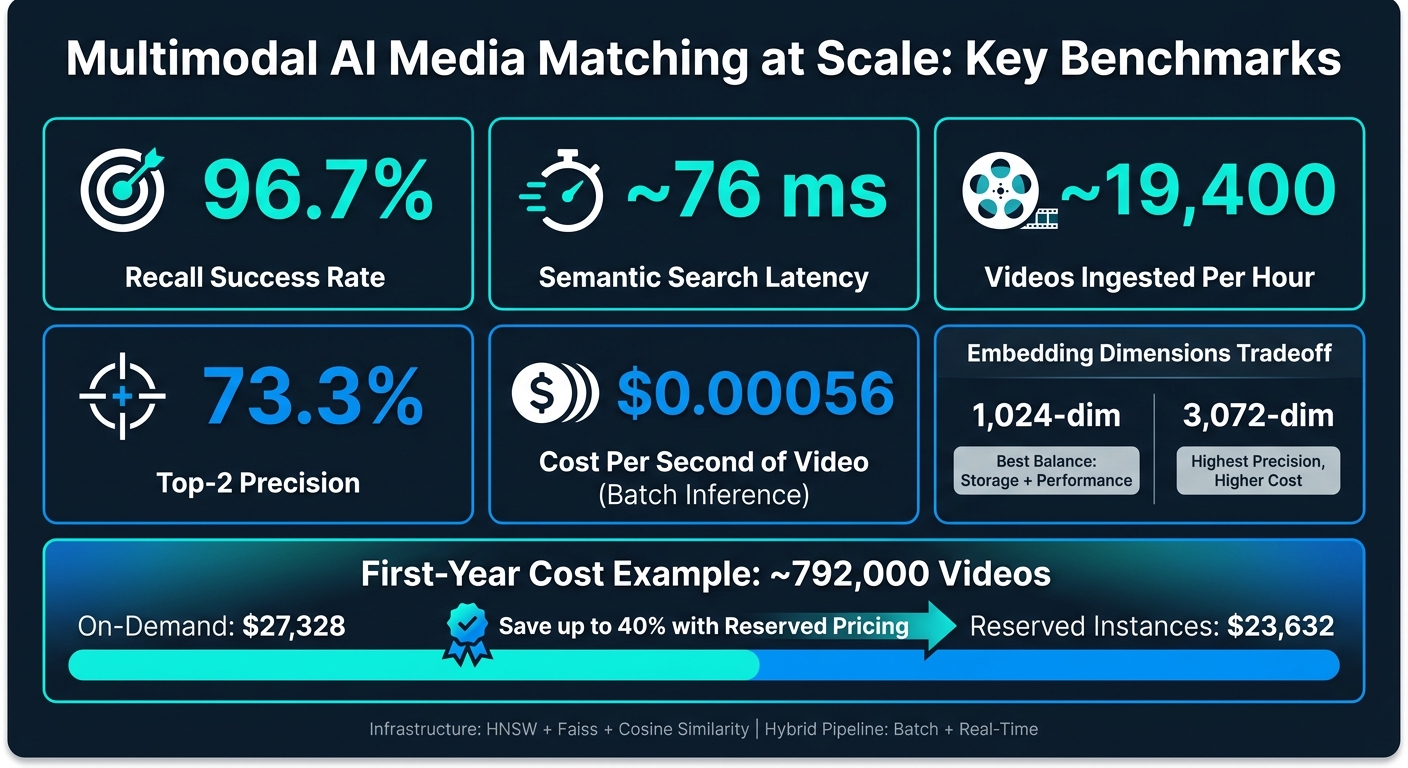
Multimodal AI Media Matching: Key Performance Benchmarks & Cost Metrics
Lecture 5 – Multimodal Fusion (MIT How to AI Almost Anything, Spring 2025)
sbb-itb-738ac1e
Build the multimodal embedding pipeline
Standardize media before you index it. If you skip that step, retrieval quality can fall apart fast as your library grows. This is the part that makes retrieval, verification, and enforcement work in practice.
Preprocess images, video, audio, and text for consistent matching
Each modality needs its own prep work before embedding. Chunk video into 5- to 15-second segments based on the retrieval granularity you need [1][2]. Resample audio to a single sample rate before embedding. Normalize Unicode before embedding text.
That prep work matters more than it may seem. When inputs are processed in different ways, their embeddings drift apart and become harder to match well. Retrieval quality drops as a result [2]. When preprocessing stays consistent, embeddings remain more comparable across media types and across later updates.
Use shared embeddings and chunking for cross-modal retrieval
Map text, images, video, and audio into one vector space. Then a natural-language query can land near the most relevant media segments [2].
To keep indexing and search in sync, use separate indexing and search modes. For example, create chunk-level embeddings when indexing long-form media, and use a search-focused embedding mode for queries [1][2]. Use 1,024 dimensions when you want a strong accuracy-to-storage tradeoff, solid English performance, and much lower storage use than 3,072-dimensional vectors [1][2].
For audio-visual content, use multimodal embeddings so one vector reflects both the visual scene and the audio track. That helps retrieval when content has been edited, compressed, or partly reused [1][2]. This is particularly effective when combined with invisible watermarking to maintain ownership signals through transformations.
That shared vector space only becomes useful when each chunk in the index also keeps its source metadata.
Store vectors with metadata for enforcement workflows
Every stored segment should include a consistent set of fields that support downstream action.
| Metadata Category | Essential Fields | Purpose |
|---|---|---|
| Retrieval | video_id, segment_index, timestamp, s3_uri |
Fast lookup |
| Verification | owner_id, license_type, expiration_date, [source provenance](https://www.scoredetect.com/blog/posts/how-blockchain-enhances-digital-watermarking) |
Rights verification |
| Enforcement | match_score, confidence_threshold, policy_outcome, audit_log |
Defensible takedowns |
| Technical | model_type, model_version, embedding_dimension, normalization_parameters |
Targeted reprocessing |
Store model_type, model_version, and normalization_parameters with every vector. If you update the embedding model or change preprocessing steps, versioned metadata lets you reprocess only the affected items after those model changes [2][3].
For the index, use an HNSW algorithm with a Faiss engine and cosine similarity. This supports logarithmic retrieval behavior across large libraries [1][2].
With vectors and metadata in place, ranking rules decide which matches show up first.
Design retrieval and ranking for dynamic media libraries
Once your vectors are indexed, the next step is choosing the right retrieval path based on the query, the asset you want to find, and how much latency you can afford. In protection workflows, ranking does more than sort results. It acts as the checkpoint between a possible match and a takedown call. That’s what turns embeddings from a neat data layer into search results you can act on.
Choose between text-to-media, media-to-media, and hybrid search
Each query pattern plays a different role in production.
Text-to-media search works when someone wants to describe a scene, object, or action in plain English. It’s a good fit when a creative team knows what they want but not the exact file name or asset ID.
Media-to-media search uses an asset as the query. That makes it the most direct option for duplicate detection and for finding near-duplicate content with low latency.
Hybrid search blends vector similarity with keyword matching across separate vector and keyword indexes. It often gives you the best precision, especially when metadata is clean and dependable. The tradeoff is extra system overhead.
| Search Pattern | Best For | Precision | Latency |
|---|---|---|---|
| Text-to-Media | Descriptive query matching | High | Moderate |
| Media-to-Media | Duplicate and near-duplicate detection | Very High | Low latency |
| Hybrid | Highest precision when metadata is reliable | Highest | Higher |
A good starting point for hybrid retrieval is a 70/30 weight split: 70% vector similarity and 30% keyword matching. If your library includes strong, human-verified metadata tags, you can push the keyword share up to 50% [1].
After you pick the search mode, the next job is setting thresholds. That’s where you decide which matches can kick off automation and which ones need a person to take a look.
Tune similarity thresholds to cut false positives at scale
Use cosine similarity to score query-to-asset matches [2]. Then split results into three confidence bands: low, borderline, and high confidence. For high-risk assets, borderline matches should go to manual review instead of automatic action [2].
That sounds simple on paper, but the rule only holds up if your index stays fresh and your latency stays steady as the library grows.
Scale infrastructure, throughput, and reliability
Once retrieval is dialed in, the next job is keeping ingestion, indexing, and search steady as volume grows. A bigger library can’t mean slower matching. Rights checks, takedowns, and ownership verification all depend on search staying fast and dependable. The setup you choose affects match speed, cost, and uptime.
Balance batch, real-time, and hybrid processing models
Your processing model should match the type of content coming in and how fast you need results.
Batch processing works best for large historical libraries and high-volume reprocessing. Real-time processing fits new uploads that need to be indexed right away. A hybrid model gives you both: batch for large backfills, real-time for new content.
An event-driven setup can make this much smoother. For example, when a file lands in object storage like S3, it can automatically trigger an embedding function, which cuts out manual handoffs [2]. For large video files, asynchronous calls are the better choice because they help avoid API Gateway timeouts. Synchronous APIs are a better fit for text and images [2].
| Pipeline Style | Throughput | Cost | Update Speed | Ops Load |
|---|---|---|---|---|
| Batch | Very High | Lowest (Batch pricing) | Low (Periodic updates) | Moderate (orchestration needed) |
| Real-time | Moderate | Higher (On-demand/Serverless) | Instant | Low (event-driven) |
| Hybrid | High | Balanced | Near-instant | High (dual-index management) |
A practical pattern is simple:
- Use batch for backfills and large reprocessing jobs
- Use real-time for new uploads
- Use a queue such as Amazon SQS to separate ingestion from embedding generation, which helps avoid bottlenecks when file processing times vary across media types [2]
That last point matters more than it may seem. If one video takes much longer than another, a queue keeps the whole pipeline from getting stuck behind a few heavy jobs.
Monitor index health, latency, and reprocessing workflows
At scale, small slowdowns can turn into large backlogs. That’s why it helps to watch a few core metrics closely: p95 latency, queue depth, and failure rate.
If p95 latency goes above 200 ms, start by checking shard balance and overall index health.
You also need to keep an eye on your job queue against provider concurrency limits. Say an asynchronous embedding API allows only 30 concurrent jobs. If your queue depth keeps climbing past that point, you’re building a backlog whether you mean to or not [1].
Track job states like Completed, Failed, and Expired, and set automatic retries for failures. Re-indexing is also needed when you change embedding dimensions or move to a new model version [2]. Model updates, re-encoding, and reprocessing all help keep the index in step with changes in the asset library.
Reliable matching depends on this behind-the-scenes work. If assets change but the index doesn’t, your results start drifting.
Plan cloud costs around compute, storage, and retrieval volume
The main cost drivers are inference, storage, and query volume. Those three shape how much of your library stays hot, how often you can re-index, and how fast you can return matches.
For video, batch embedding inference costs about $0.00056 per second of content [1]. Storage costs are heavily affected by embedding size. 3,072 dimensions make sense when you need the highest precision and can justify the extra spend. 1,024 dimensions are the better balance for most enterprise workflows [1][2].
You can also cut spend by moving cold vectors to lower-cost storage and using Reserved Instances for your vector database. Reserved pricing can reduce annual costs by up to 40% compared with on-demand rates [1]. In one first-year example, a system handling about 792,000 videos cost around $27,328 on-demand and about $23,632 with Reserved Instances [1].
Once the pipeline is stable, matching results can flow into ownership proof and enforcement workflows. That’s what keeps multimodal matching fast enough for enforcement and ownership verification.
Apply multimodal matching to content protection and ownership verification
With the pipeline stable, the next step is to turn matches into enforcement and ownership records. That matters because piracy and rights checks rarely deal with perfect duplicates. Most of the time, you’re looking at content that’s been cropped, clipped, compressed, or remixed.
Use InCyan‘s multimodal workflows for enterprise-scale asset identification

Idem by InCyan matches images, video, and audio across edits, memes, cropping, and compression. So even if an asset has been heavily changed, it can still identify ownership.
Its AI-powered multimodal matching platform can detect content ownership even when only 10% of the original asset remains. That’s the kind of resilience that makes enforcement practical instead of hit-or-miss.
When a match looks credible, record the source version before taking action.
Add ScoreDetect timestamping for provenance and defensible records

ScoreDetect records a checksum on blockchain, which creates a tamper-evident ownership timestamp without storing the media on-chain.
ScoreDetect’s Formal Recognition Certificates add a dated ownership record. And with Zapier-connected workflows, timestamping can happen automatically when new assets enter the pipeline.
Put together, Idem and ScoreDetect complete the loop: match → timestamp → enforce.
FAQs
How do shared embeddings improve media matching?
Shared embeddings improve media matching by mapping images, video, audio, and text into the same high-dimensional numerical space. That lets a system focus on semantic meaning, not just surface details.
So if two assets mean the same thing, they stay close together in that space, even after edits like cropping, filtering, or re-encoding.
Backed by InCyan’s Idem technology, this approach also helps with scale across large libraries. It can keep content identifiable even when one signal, such as visual metadata, is removed or altered.
When should I use batch vs. real-time processing?
Use real-time processing for time-critical workflows that need immediate detection or blocking, like stopping infringing content before it reaches users.
Use batch processing for large-scale ingestion or background tasks where speed matters less. If you’re dealing with high asset volumes, use both: send urgent or high-confidence content through real-time checks, and route everything else to batch queues to keep things efficient and control costs.
How do I set safe match confidence thresholds?
Set safe match confidence thresholds by balancing automation with manual review. The goal is simple: give each analysis a confidence score, then route it based on how sure the system is.
High-confidence matches can go straight into automated enforcement. Medium-confidence results should go to human review so you keep precision in check.
This kind of routing works best when thresholds are tied to the model you’re using, not treated as one-size-fits-all. For example, some high-performing models reached 90% precision with a cosine similarity threshold of 0.75.