If you want to track reposted clips at scale, I’d do five things: prepare assets before release, monitor platforms, match reposts to source files, save proof, and act fast. That matters because video piracy costs media companies about $75 billion a year, and sports piracy in the U.S. alone tops $5 billion.
Here’s the short answer:
- I’d give each clip one permanent asset ID
- I’d keep a list of every official account and channel
- I’d add invisible watermarking, fingerprints, and trusted timestamps before publishing
- I’d use YouTube Content ID, Meta Rights Manager, and added web/social monitoring
- I’d log each repost with the URL, uploader, views, screenshots, date/time, and file hashes
- I’d send high-priority cases into takedown or legal review right away
What this means in practice: I’m not just looking for stolen clips. I’m building a repeatable system that tells me what was reposted, where it appeared, who posted it, how far it spread, and whether I have enough proof to file a claim.
A simple way to think about it is:
- Prepare the clip before it goes live
- Monitor social platforms and sites
- Detect matches, even if the clip was edited
- Prove ownership and timing with logs, screenshots, and hashes
- Enforce through claims, removals, delisting, or legal steps
| Step | What I track | Why it matters |
|---|---|---|
| Prepare | Asset ID, rights data, official channels | Stops mix-ups with licensed posts |
| Protect | Watermarks, fingerprints, timestamps | Links reposts back to the source |
| Monitor | Platforms, accounts, URLs, first-seen time | Finds reposts before they spread more |
| Prove | Screenshots, views, metadata, SHA-256 hashes | Supports takedowns and disputes |
| Enforce | Claim status, removals, repeat offenders | Shows what’s working and what isn’t |
If I were setting this up today, I’d treat repost tracking as a daily workflow, not a one-time search.
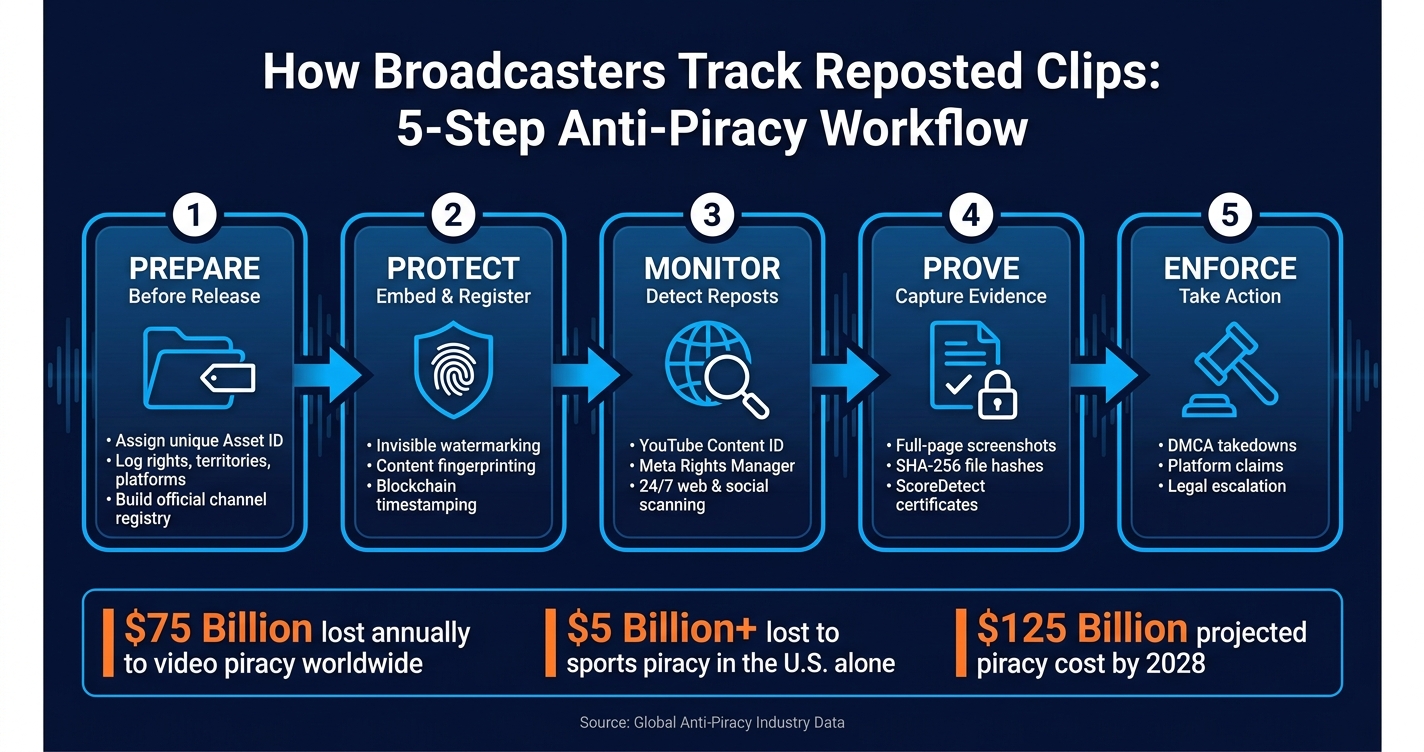
How Broadcasters Track Reposted Clips: 5-Step Anti-Piracy Workflow
1. Set Tracking Goals and Build a Reference Library
Before you monitor anything, get your records in order and map every official channel. If you skip that step, detections get messy fast, and licensed uploads can look a lot like unauthorized reposts. The fix is simple: build the reference library before the first clip goes out.
Catalog Every Master Clip and Official Publishing Channel
Each master clip needs a unique, permanent asset ID linked to a full metadata record. At a minimum, that record should include the title, program or episode or match ID, air date and time, duration, rights owner, rights window, territories, and platform restrictions. It should also store watermark and fingerprint IDs, plus canonical URLs for every official post.
You also need a central channel registry for every verified account and distribution endpoint. That includes official YouTube channels, Facebook pages, Instagram accounts, TikTok handles, OTT apps like Roku and Fire TV, plus proprietary apps and web video players. Add notes showing which content types each channel is allowed to publish. That registry helps the team rule out approved uploads fast, so they don’t burn time on the wrong takedowns.
A rights-aware DAM or MAM can store these records and use validation rules to block export until the required anti-piracy fields are filled in. For broadcasters with multiple regional feeds and language variants, it also helps to store variant relationships. That way, a Spanish-language highlight can be traced back to its master clip and approved distribution points.[7][5][6][4] Once the reference library is done, each master can be tagged before distribution.
Set Tracking Metrics That Connect to Revenue and Enforcement
Set your measurement rules before monitoring begins. That’s the difference between random takedowns and a real enforcement program.
For every repost, track:
- Total repost count per asset
- Platforms where reposts appear
- Uploader identity
- Estimated views
- Time-to-discovery, measured from publish to first detection
Also track repeat infringement by uploader, asset, and platform.[8][10]
Use priority tiers to set response speed. Tier 1 clips, especially high-value sports highlights inside exclusive windows, should trigger immediate action. In U.S. sports broadcasting, anti-piracy teams often build league-specific playbooks for events like the Super Bowl or March Madness. Those workflows are set in advance and can kick in automatically, because unauthorized reposts during those windows can hit revenue hard.[9][10][11]
With goals, asset records, and priority tiers in place, monitoring can stay focused on the clips that matter most.
sbb-itb-738ac1e
2. Apply Invisible Watermarking, Fingerprinting, and Timestamping Before Distribution
Track clips before they go out. Once a clip is live, you’re no longer setting up protection – you’re following clues after the fact. These pre-release signals support the monitoring, proof, and takedown work that comes next. Use the asset IDs, channel IDs, and rights windows from your reference library as the inputs for watermarking, fingerprinting, and timestamping.
Embed Invisible Watermarks to Trace Source Leaks
Start with the mezzanine master before you create any platform version. Invisible watermarking places ownership and distribution data right into the video signal in a way viewers can’t see, but a detector can pull back out. It stays in place through recompression, resizing, and the format changes social platforms apply.
The watermark payload includes the asset ID, channel ID, rights window, and distribution route. From there, each platform version – like 16:9 for YouTube, vertical for Reels/TikTok, or 720p for some OTT apps – is encoded from that watermarked master. If an unauthorized clip shows up, forensics can help show ownership and the leak path, whether it came from a cable feed, an OTT partner, or an internal review copy. That gives you source-level evidence. Fingerprinting then helps find the reposted clip, even when it’s been edited.
Generate Content Fingerprints for Automated Matching
Create fingerprints for video, audio, and still frames so cropped, captioned, or partly edited reposts can still match. A content fingerprint is a compact signature that can be matched against new uploads at scale, without needing the original file during comparison.
Generate fingerprints at mastering or ingest, then store them in one centralized, queryable database. That database becomes the reference library your automated monitoring tools check all the time. When a match appears, timestamp the master and its key variants so you have proof ready for enforcement.
Timestamp Master Assets and Variants with ScoreDetect
ScoreDetect records a cryptographic hash, owner, registration date, and blockchain proof for each master and variant. That hash is anchored to a public blockchain, which creates a timestamped record you can check later if ownership is disputed.
ScoreDetect fits into broadcaster workflows in a few ways:
- An API for automated pipelines
- A web dashboard for urgent or one-off assets
- A WordPress plugin for digital-first publishing teams whose clips go live through a CMS
Use these three methods together before release. Each one handles a different weak spot: invisible watermarking points to the leak source, fingerprinting spots the reposted clip even after heavy editing, and timestamping secures a verifiable ownership record – all before the clip is published.
3. Monitor Social Platforms and the Web for Reposted Clips
Once your reference assets are ready, move into active monitoring. The goal is simple: find unauthorized reposts before they spread. Start with your highest-value clips, then expand coverage as your reference library grows.
Use Platform-Native Rights Tools to Scan Reference Files and Flag Matches Automatically
On YouTube, upload your clean reference files into Content ID so YouTube can fingerprint them and scan new uploads on its own.[12][14][18] When YouTube finds a match, the dashboard shows the uploader’s channel, the video URL, match type, match length, and views.[12][3][14] From there, you can choose to block, track, or monetize the match.[12][13][14] In practice, it helps to sort cases by views, repeat offenders, and clips tied to premium viewing windows.
Meta Rights Manager covers Facebook and Instagram from a single reference library.[19][20][21] You upload your reference files once, set match rules, and Meta scans both platforms on a continuous basis for matches.[2][16][17] You can also add ownership links to label matched posts and direct viewers to your official channels.[16]
Add Automated Monitoring for Broader Social and Web Coverage
This step fills the holes left by platform-native tools. YouTube Content ID won’t catch reposts on TikTok, X, or Twitch, and Meta Rights Manager only covers Facebook and Instagram.[12][13][2][16] If your clips travel across a mix of platforms, that’s a big blind spot.
ScoreDetect Enterprise adds 24/7 automated monitoring across major social platforms, short-form video apps, live streams, and websites. It uses AI-driven fingerprinting and site scanning to compare suspect clips against your registered references, then shows unauthorized usage in one dashboard. Each alert includes the platform, account, URL, views, and first-seen time.
That setup gives your team a cleaner way to review reposted clips by platform, territory, account, and time period. You can also check metrics like total infringing views, the number of unique unauthorized uploads, and growth trends. High-value matches should go to review right away. If a high-value clip passes a set threshold, the system alerts your rights team so they can move fast.
Use Reverse Video and Frame-Based Searches to Fill Gaps
Automated systems still miss some reposts, especially when the clip has been heavily changed, like mirrored, sped up, placed inside compilations, or covered with commentary graphics.[15] That’s where a manual layer helps. Use manual review only for clips outside automated coverage.
Pull key frames from your master clip and focus on visuals that stand out, such as score bugs, broadcast logos, or unusual scene composition. Then run those frames through Google Lens or another visual search tool to find similar thumbnails across platforms. This works well for regional or language-localized edits that keep the same visuals but slip past fingerprint matching.
A simple weekly sweep can go a long way:
- Review your top 10 highest-value clips that sit outside automated coverage
- Look for transformed reposts
- Feed what you find back into future detection work
4. Collect Evidence and Act on Takedowns or Enforcement
Once monitoring flags a repost, move fast. The goal is to turn that alert into evidence people can use. A screenshot by itself usually won’t cut it. Rights, legal, and ops teams need a clean case file they can review and act on right away.
Use the same asset ID, first-seen time, and priority tier from monitoring when you open each case. That keeps everything tied back to the original record and cuts confusion later.
Capture the Exact Evidence for Each Repost
For every infringing repost, record the full URL, platform name, uploader handle, and profile URL. Also capture the post’s visible timestamp, caption, hashtags, and any watermark or credit that appears on screen.
Take at least one full-page screenshot that shows the browser address bar, platform UI, caption, and engagement metrics – views, likes, comments, and shares or reposts – all in the same frame. If the clip plays inline, grab a separate frame from the video player too. Log the discovery date and time in U.S. format with timezone, such as 08/27/2026 09:15 AM PT. Record the view count at that exact moment, because platforms can change or remove that data fast.
Every entry should link back to your master asset ID in a central evidence log. Each incident also needs its own case ID. So if one clip is reposted in several places without permission, each repost becomes a separate record you can track on its own. As the case moves forward, update the log with status changes like removed, geo-blocked, age-restricted, demonetized, or mirrored elsewhere.
Store logs in a write-once or audit-logged system. Right after capture, calculate SHA-256 hashes for all files. That’s what helps if someone later tries to question whether the records were changed.
Capture these fields for every case:
- Full infringing URL and platform name
- Uploader handle and profile URL
- Full-page screenshot showing address bar, UI, caption, and engagement metrics
- Visible post timestamp and caption text
- View and engagement counts at the moment of capture
- Discovery date and time in U.S. format with timezone
- Master asset ID linking the repost to your canonical source record
- SHA-256 hashes of all captured files and logs
Use ScoreDetect Certificates to Prove Ownership and Timing
Attach the certificate to the same case record as soon as the capture is saved.
ScoreDetect Verification Certificates record a cryptographic hash of your original master file and key metadata, along with a trusted timestamp. That gives you a record of ownership and timing from before the repost went live. Formal Recognition Certificates extend that record to the infringement event itself by recording hashes of screenshots, exported logs, and infringing media files alongside detection timestamps.
Put those together, and the timeline becomes easy to follow: original asset registered → infringing repost detected → enforcement action taken. For routine DMCA notices, a short extract – infringing URL, rights claim, and certificate ID – is often enough. If you’re dealing with repeat infringers or monetization disputes, the full evidence bundle gives outside counsel the hashes of source files, screenshots, and logs they need. Each item is tied back through certificate IDs and can be checked by re-hashing the included files.
Automate Delisting, Takedowns, and Escalation Rules
ScoreDetect Enterprise can help automate takedown and delisting workflows as soon as a repost is matched. Based on preset rules – asset sensitivity, view count thresholds, territory, or timing relative to broadcast – the system can submit platform claims automatically, send items into internal review queues, or alert legal teams for immediate action.
Use that same evidence pack across platform takedowns, search delisting, and repeat-infringer escalation.
Conclusion: Build a Continuous Anti-Piracy Workflow, Not a One-Time Search
Unauthorized reposting doesn’t happen once and disappear. It keeps going, especially during live sports, premieres, and tentpole events. Online video content piracy already costs the global media sector an estimated $75 billion per year, and that figure is projected to hit $125 billion by 2028[1]. A one-time search gives you a snapshot. A continuous workflow shows you the pattern.
Once monitoring is up and running, the next step is simple: turn each detection into a repeatable enforcement process. That starts before release. Create asset records. Add watermarking, fingerprinting, and trusted timestamping. Then monitor on a steady basis through platform-native tools and broader web coverage. If a repost shows up, collect evidence in a format that’s clean, hashed, and linked back to the verified original so action can move fast instead of getting stuck on proof.
That prep work matters because enforcement runs on evidence, not suspicion. The better the proof, the faster the response. A certificate, hash, screenshots, and a fingerprint match will move things along far faster than a vague complaint. That applies to DMCA notices, platform claims, and legal escalation.
It also helps to track what the workflow is doing inside the business. Watch the average time from detection to removal, total infringements resolved per month, and estimated ad revenue protected. Those numbers help stakeholders see what the program is doing in plain terms. Even partial recovery of lost viewership can protect ad revenue and strengthen partner negotiations.
In day-to-day use, the workflow comes down to a few operating rules:
- Pre-distribution protection needs to be part of your export and publishing pipeline – watermarking, fingerprinting, and timestamping should happen before release, not after a leak appears.
- Platform-native tools can process high volumes well, but they still miss a meaningful share of reposts – outside monitoring and reverse-video search help close that gap.
- When enforcement begins, evidence quality shapes response speed – build the workflow to run on a continuous basis, and the results add up over time.
FAQs
What’s the fastest way to start tracking reposted clips?
The fastest way to handle this is to build tracking into your media workflow before distribution.
Start by registering official assets and generating AI-based fingerprints. That way, clips can still be identified even after common edits like cropping or re-encoding.
At the same time, embed invisible forensic watermarks in master files so you can trace the source later. When you automate these steps and pair them with social platform monitoring, you get a real-time workflow that spots unauthorized reposts and helps your team act fast.
How do I tell unauthorized reposts from licensed or official uploads?
Use three checks:
- Fingerprinting matches the video even if it was cropped, compressed, color-shifted, or edited.
- Invisible watermarking traces the repost to the specific user, CDN node, or affiliate partner.
- Blockchain timestamping helps prove ownership with a tamper-proof registration record.
Together, these methods make it much easier to tell approved uploads from unauthorized reposts and back up enforcement.
What proof do I need for a takedown claim?
You need a defensible evidence package built around two things: proof of ownership and proof of a match.
That usually means adding a blockchain timestamp or a cryptographic SHA-256 checksum registration certificate, along with the reposted clip’s match score, discovered source, and timestamp.
You should also include:
- Screenshots or HTML snapshots of the infringing post
- Frame-level overlap with the reference asset
- An invisible watermark extraction report, if one is available
Put all of that into the DMCA or platform notice before you file.