If audio and video marks stop lining up, something changed. That is the core idea: I can timestamp a clean master, place the same hidden ID in both tracks, and then check whether the IDs, timing, and tamper signals still match after sharing, compression, trimming, dubbing, or re-encoding.
Here’s the short version:
- I start with a clean master
- I create a SHA-256 baseline and timestamp it with ScoreDetect
- I embed synced hidden marks in audio and video
- I test a suspect file for ID match, timing drift, and tamper masks
- I log the results for legal, compliance, or platform review
A few numbers stand out:
- Audio watermarking in the article uses 32 bps for ID and timeline data
- Video timing support uses a 3-frame window
- InCyan Idem can still match content when only 10% of the source remains
- Audio quality can stay high, with PESQ above 4.0
What matters most is not the watermark by itself. It is the chain:
- Baseline
- Embedded IDs
- Sync check
- Extraction results
- Evidence log
If I see an ID mismatch, the file does not match the registered source. If the ID matches but the tamper mask is not zero, part of the media changed. If audio and video drift apart, that points to cuts, splices, time changes, or sound swaps.
In plain terms: this workflow is about proving what the file was, what was put into it, and where the later copy stops matching.
| Check | What I look for | What it can show |
|---|---|---|
| Baseline | SHA-256 record and timestamp | Source state on day one |
| Watermark ID | Match or mismatch | Source link or replacement |
| Tamper mask | Zero or non-zero | Edited zones or time ranges |
| A/V sync | Offset or drift | Cuts, frame drops, time changes |
| Fallback match | Partial match against source | Source link when extraction is weak |
So the article’s main point is simple: use hidden audio-video marks plus a timestamped source record to spot edits that eyes and ears may miss.
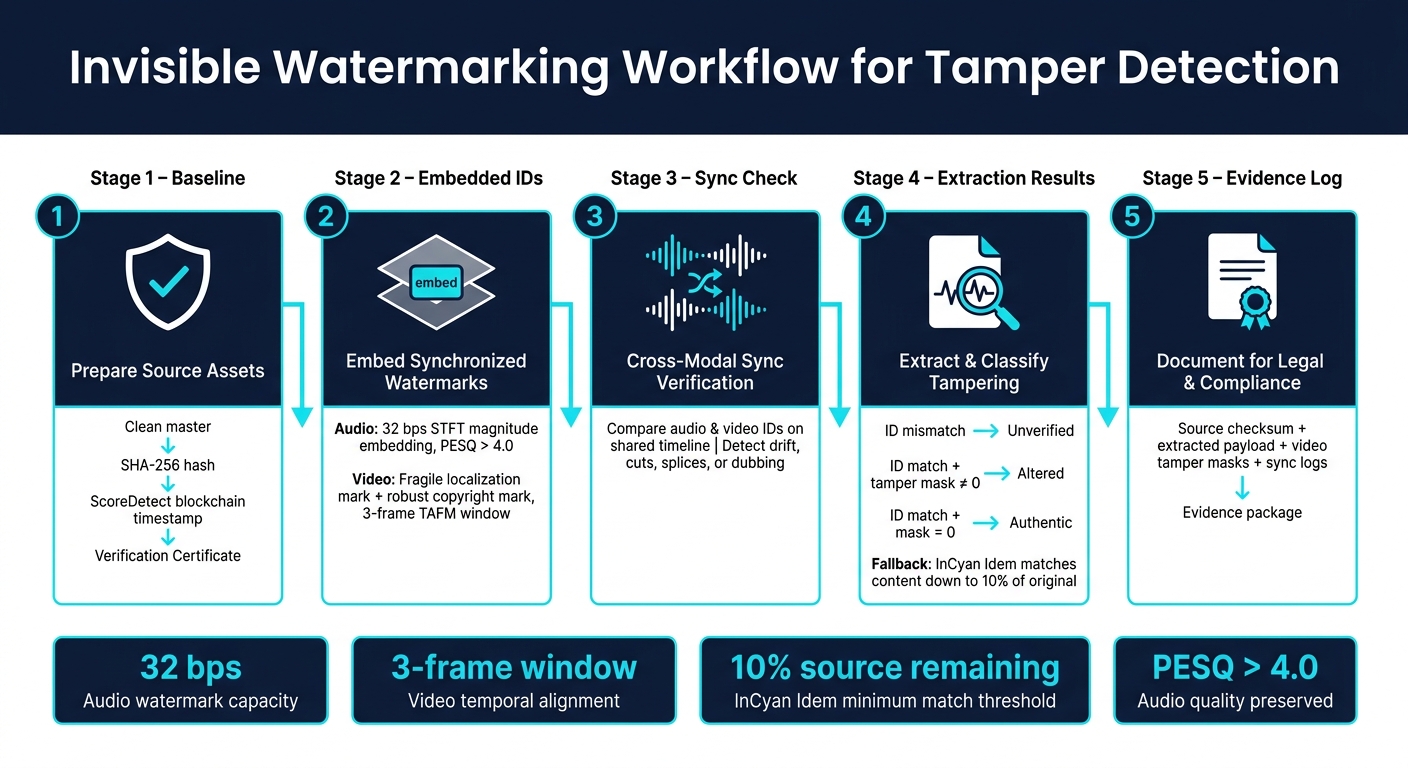
Invisible Watermarking Workflow for Tamper Detection
Invisible Watermarking: Content Provenance for Videos at Scale | Wes Castro, Meta
sbb-itb-738ac1e
Step 1: Prepare source assets and define the verification baseline
Start with clean masters. Before you create the baseline, standardize frame rate, sample rate, and timecode.
Use clean masters with stable frame rate, sample rate, and timecode
Use the highest-quality masters you have. Skip any transcoding before the baseline, and keep audio sample rate and video frame handling the same across all assets. You also need to preserve the same sync relationship across every master you register.
Once those masters are lined up, set the payload based on the integrity checks you’ll need later.
Decide what the watermark payload should carry
Use a two-layer payload. The first layer should hold ownership fields like Owner ID, Asset ID, and version number. The second layer should hold fragile integrity markers that can expose timing shifts.
If audio and video are supposed to verify each other, add a cross-modal link so both streams can be checked together [1].
After that, lock the source state with a timestamped baseline.
Create a timestamped baseline with ScoreDetect

Generate a SHA-256 hash for each asset and register it with ScoreDetect to create a blockchain timestamp. ScoreDetect records the SHA-256 checksum and blockchain reference, but it does not store the media file. Keep the Verification Certificate as the baseline for every later extraction.
With the baseline locked, embed synchronized watermarks on the same timeline in both tracks.
Step 2: Embed synchronized invisible watermarks in audio and video
With the baseline locked, the next move is to embed marks that stay in sync even after re-encoding and common distribution edits. That shared baseline means the audio and video watermarks can live on the same timeline.
Choose a shared timeline for both audio and video
Use one timeline across both tracks so each watermark can be checked against the same timestamps. On the video side, a sliding window of 3 frames with a Temporal Alignment and Fusion Module (TAFM) lines up supporting frames with a reference frame. This keeps the watermark steady over time and helps cut down flicker [1].
For audio, skip start-only sync codes. Instead, use a frame-wise broadcast strategy that places the full watermark payload into every single audio frame feature [2]. That way, extraction can still work from the parts that survive.
Embed audio and video marks that survive routine processing
Use two types of marks: one to show tampering, and one to make it through compression and normal edits.
For video, use a sequential embedding method: a fragile localization watermark to flag pixel-level changes, plus a robust copyright watermark that survives H.264/AVC compression and common edits [1].
For audio, embed marks in the magnitude spectrogram with Short-Time Fourier Transform (STFT), not the raw waveform [2]. Leave the phase spectrogram unchanged to protect audio quality, with PESQ scores above 4.0 [2]. A 32 bps capacity is enough to carry the Owner ID, Asset ID, and timeline position from Step 1 in both tracks [2].
Put simply:
- Video uses a fragile localization mark and a robust copyright mark
- Audio uses STFT magnitude embedding while keeping phase unchanged to limit distortion
Once both tracks carry the same payload, Step 3 can check whether they still line up. This process is often paired with blockchain-based verification to ensure the timeline remains immutable.
Add a second verification layer with InCyan matching tools

Add a second matching pass for cases where extraction is partial or degraded. Idem from InCyan compares altered assets against the original baseline and is built to identify content ownership even when only 10% of the original asset remains, including mobile edits, cropping, and compression [1].
Tectus adds blind watermarking for images, video, and audio without using visible watermarks. That gives you another verification path alongside Idem when watermark recovery falls short.
Step 3: Detect tampering by extracting marks and checking sync
At this stage, verification comes down to three checks: extract, compare, and document.
Compare watermark presence, payload integrity, and timeline alignment
Run the suspect file through the decoding modules to recover the visual and audio tamper signals, along with the embedded watermark IDs. From there, the logic is simple:
- ID mismatch → content is unverified [1]
- ID matches but tamper masks are non-zero → some parts were altered, such as object removal or audio dubbing [1]
- ID matches and masks are zero → content is verified as authentic [1]
If one track is degraded, use cross-modal extraction to recover the ID from the other. Then compare the expected timestamp with actual playback time to catch drift caused by time-scale modification.
Use the matrix below to classify the edit before you write the report.
Map common edit types to watermark failure patterns
Each edit type leaves its own fingerprint across audio and video extraction.
| Tampering Type | Audio Extraction Symptom | Video Extraction Symptom | Cross-Modal Sync Check |
|---|---|---|---|
| Cuts / Cropping | Missing segments; payload recovered via averaging [2] | Discontinuity in the frame sequence [2] | Timeline shift or drift [2] |
| Splices / Overlays | Mismatched watermark ID [1] | Mismatched watermark ID [1] | ID mismatch between modalities [1] |
| Deepfakes / Local Edits | Audio mask shows dubbing traces [1] | Pixel-level mask failure in the edited area [1] | Sync usually maintained [1] |
| Time-Stretching | Accuracy drop; TSM ratio detected [2] | Frame rate or duration mismatch [2] | Cumulative timing drift [2] |
| Object Removal | No change if audio is untouched [1] | High-intensity values in the visual mask [1] | Sync remains; visual integrity fails [1] |
| Audio Replacement | Missing or mismatched watermark ID; audio tamper signal non-zero while visual mask reads clean – strong indicator of unauthorized dubbing or sound replacement [1] | Video watermark intact [1] | Modality mismatch [1] |
Use the pattern you find to anchor the final evidence log.
Verify evidence against ScoreDetect and InCyan analysis
Cross-check the extracted IDs against the ScoreDetect baseline record from Step 1. If the IDs don’t match, record that gap as evidence of modification. When extraction is partial, use InCyan matching to confirm the source.
For partial extraction cases, log the recovery accuracy for each segment. A sharp drop in one section usually points to local tampering or heavy degradation, while routine transcoding tends to cause only a slight decline [2]. Include the extracted IDs, sync offsets, timestamps, tamper masks, and recovery accuracy values so the findings are easy to review during internal investigations or legal review.
Step 4: Build invisible watermarking into an enterprise workflow
Once you’ve verified a single file, the next job is making that same process work across the entire library.
Automate ingest, monitoring, and escalation
At scale, the flow should be automatic: ingest, watermarking, timestamping, monitoring, and extraction. Each step should pass data to the next, so no file moves into distribution without a verifiable baseline attached.
After that automation is set, evidence handling needs to stay consistent. Use the same embed-and-check logic across the library: Tectus for invisible watermarking, ScoreDetect for timestamped baselines, and Idem for multimodal matching when extraction is incomplete.
Document findings for legal, compliance, and platform action
When sync fails or payloads don’t match, every verified or flagged asset should generate a standard evidence package [1]. At a minimum, that package should include the source checksum, extracted payload, video tamper masks, and sync logs.
Video tamper masks show where in the frame an edit happened. Audio tamper windows show when in the timeline the sound changed. Both matter for platform enforcement and legal review.
"source checksum"
"extracted payload"
"video tamper masks"
"sync logs"
Conclusion: Build a layered tamper detection process
This process works because each layer checks what the last layer might miss: clean masters, synchronized payload embedding, ScoreDetect timestamping, cross-modal extraction, and InCyan tool verification.
Use one workflow across production, ingest, and distribution:
- Embed
- Timestamp
- Monitor
- Extract
- Document
That keeps the workflow repeatable from baseline to enforcement. Pre-embedded watermarks preserve proof before tampering starts.
FAQs
How does invisible watermarking reveal tampering?
Invisible watermarking can reveal tampering through fragile watermarks. These watermarks are made to break or shift when someone changes a file. They’re built into pixel values or audio bitstreams and work like a digital sign that says the file is intact.
Once content is edited, cropped, or changed in some other way, the watermark no longer holds up. That gives owners a clear signal that someone made unauthorized changes. Some advanced systems can even show which parts of the file were affected.
What kinds of edits can this workflow detect?
This invisible watermarking workflow can spot a wide range of edits, from deliberate tampering to everyday processing changes.
It can detect object removal, copy-and-paste edits, cropping, resizing, rotation, and zooming. It also flags tampered audio segments, time stretching or shrinking, pitch shifting, re-sampling, format conversion, re-encoding, compression, filtering, and screen recording.
What if the watermark is only partly recoverable?
If a watermark is only partly recoverable, advanced forensic systems use redundancy and error-correction coding to rebuild the missing data.
Because the watermark is placed across multiple parts of the content, detection software can piece together a complete identifier even when parts of the file are corrupted, compressed, or edited. That makes it much easier to preserve proof of ownership.