I recommend image fingerprinting software for stock photo agencies in 2026 based on three jobs: matching private catalogs, finding online copies, and handling copyright notice and takedown procedures – with edited-copy tests and total costs guiding the choice.
My shortlist is TinEye MatchEngine for private catalog search, Pixsy for web monitoring and enforcement, and InCyan Idem for testing heavily edited, multi-format matches. I would compare detection quality, catalog limits, web coverage, integrations, data controls, and 12-month costs – not treat these tools as interchangeable.
Quick Comparison
| Tool | Main use | Cost and limits listed in the article |
|---|---|---|
| InCyan Idem | Catalog matching across images, video, and audio; edit-detection claims need testing | Quote required; catalog limits not disclosed |
| TinEye MatchEngine | API search against a private image collection – not web monitoring | From $200/month for 5,000 indexed images and 1,000 searches |
| Pixsy | Online monitoring, takedowns, and recovery cases | Free for 500 monitored images; paid plans from $19/month; 50% fee on successful recoveries |
I’d start with a 30-day pilot and verify current prices and contract terms before uploading your catalog. Fingerprinting finds visual copies without changing the original file; it is not watermarking, and <u>a match is not proof of infringement</u>.
Here’s how I’d compare each tool before choosing one for your agency.
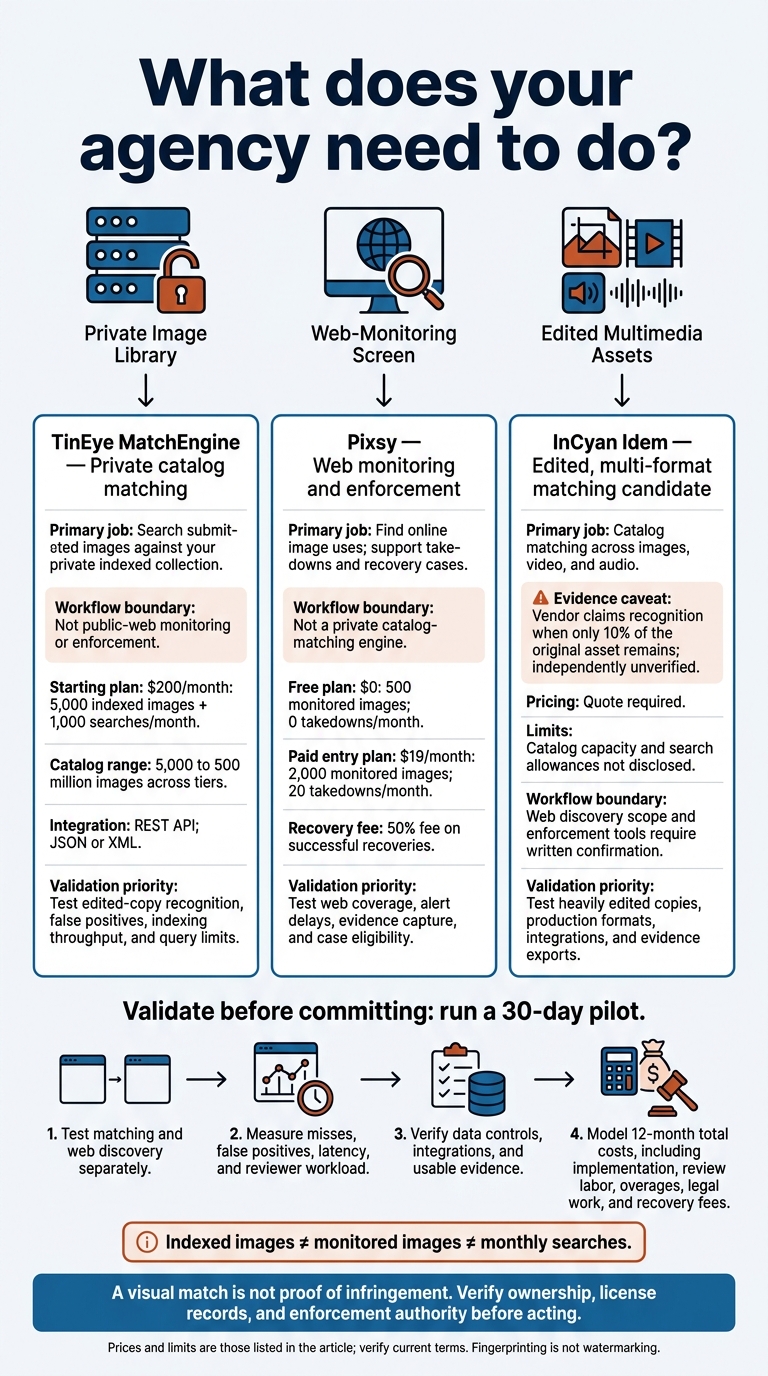
Image Fingerprinting Software: Which Tool Fits Your Agency?
1. InCyan Idem
Matching accuracy
InCyan Idem uses multimodal fingerprinting to match catalog assets across images, video, and audio. The vendor says it recognizes crops, compression, memes, and mobile edits – even when only 10% of the original asset remains.
That’s a vendor claim, not an independently verified result. No independent precision, recall, or false-positive data is public. Check whether the claimed recognition comes with documented search coverage and evidence your team can use.
Monitoring and enforcement
Match quality doesn’t tell you where the tool searches. Public documentation doesn’t disclose its discovery method, monitoring cadence, platform coverage, or enforcement tools.
Request written proof of coverage and evidence retention for outreach or takedowns. Before contacting anyone, link each match to the asset ID and license record.
Catalog scale and integrations
Catalog capacity, ingest speed, latency, and SLAs are unspecified. Confirm support for bulk uploads, incremental updates, deletion, asset IDs, metadata export, APIs, webhooks, and DAM integration.
Run a 30-day pilot using crops, screenshots, mirrors, memes, mobile edits, recompression, text overlays, and low-resolution reposts. Track misses, false positives, latency, and reviewer workload. With these details still unknown, coverage, integration, and cost should determine whether Idem makes your shortlist.
Costs and data controls
No public USD pricing is verified. Request a written quote covering catalog size, API usage, monitoring, match volume, retention, and support. Get written terms for storage, deletion, access controls, and export rights, too.
For agencies tracking heavily edited reuse, Idem may fit the task – but adoption should depend on a documented pilot.
2. TinEye MatchEngine
Matching accuracy
MatchEngine fingerprints image content and searches an agency’s private collection. TinEye says it can recognize crops, resizing, color changes, captions, and partially obscured copies.[1][4][2] Test those claims against your own catalog, checking both recall and false positives.
Monitoring and enforcement
MatchEngine searches submitted images against your indexed collection. It does not crawl the public web or handle enforcement.[4][12] Use TinEye’s comparison overlays to check edits against originals, then verify license records.[8] Its role is catalog lookup – not open-web discovery.
Catalog scale and integrations
TinEye’s private collection tiers support 5,000 to 500 million images.[7] Those numbers describe catalog limits, not discovery coverage.
The REST API returns JSON or XML and supports add, list, and delete operations.[9][11][13] Connect these operations to your DAM and keep asset IDs stable. Before committing a large library, confirm indexing throughput and concurrent-request limits. For agencies, the main tradeoff is catalog scale versus query volume.
Costs, retention, and security terms
Monthly plans start at $200 for 5,000 images and 1,000 searches. The next tiers cost $500 for 50,000 images and 30,000 searches, and $1,500 for 500,000 images and 150,000 searches. Enterprise pricing is custom, with support for up to 500 million images and 50 million searches.[7]
Budget for both storage and query volume. Confirm how the $0.005-per-search figure applies to your tier and any overages.[1][7][10] Choose a tier based on your catalog size and expected rights-review volume.
TinEye says the collection index stays private and images are stored on its secure data-center servers.[1] Before uploading restricted assets, confirm retention and deletion terms, storage location, access controls, encryption, incident response, and backup handling. Also check whether query images are retained or used for training.
3. Pixsy
Pixsy handles image discovery and enforcement, rather than private catalog lookup.
Matching accuracy
Pixsy focuses on monitoring online image use and supporting enforcement. It is not a private catalog-matching engine and does not publish independent precision or recall data.[16]
For a stock agency, run a 30-day pilot with at least 500 images. Include exact copies, crops, resizes, recompression, overlays, text, and composites. Track true positives, false positives, missed matches, and reviewer time.[16]
The main test: Does Pixsy find reused copies soon enough to support enforcement? For this workflow, coverage and alert speed matter more than lab-style accuracy claims.
Monitoring and enforcement
Pixsy provides alerts, match reports, takedown support, and compensation-case submission. Check each discovery against license records, and save the asset ID, URL, screenshot, and discovery date.
Case submission is free and unlimited on listed plans, but Pixsy takes a 50% fee on successful recoveries.[5][6][17] Its notice templates cover more than 35 countries and 14 languages.[18]
Pixsy prioritizes scans but does not publish scan-frequency guarantees. Measure alert delays and site coverage for your highest-value targets.[6][14] Use the plan table below to compare monitored volume, takedown limits, and cost.
Catalog scale and integrations
Pixsy supports uploads from a computer, Google Drive, and Dropbox, plus integrations such as PhotoShelter and SmugMug. Direct uploads and cloud imports let you monitor images that are not publicly displayed.[14][16]
Keep imported files linked to agency asset IDs so discoveries map back to your catalog. Check how Pixsy handles duplicates and whether it retains metadata.
Only annual Pro is listed as including unlimited imports and FTP. For larger catalogs or custom ingestion, confirm what the custom-priced Business offering supports.[14][15][16]
Costs and data controls
The table shows monitored-image and takedown limits – not unlimited enforcement.[6][14]
| Plan | Monthly price | Images monitored | Scan priority | Takedowns/month |
|---|---|---|---|---|
| Free | $0 | 500 | Regular | 0 |
| Personal | $19 | 2,000 | Medium | 20 |
| Advanced | $39 | 30,000 | High | 300 |
| Pro | $89 | 100,000 | Highest | 900 |
Annual Advanced is listed at $429 per year, and annual Pro at $979 per year.[6][14] Confirm whether unused takedowns roll over, which jurisdictions and platforms are supported, and whether agency use requires a Business agreement.
Ask whether uploads make private images public, whether images are used to improve models, which third-party processors receive data, and whether encryption and audit logs are available.[16] Before importing a confidential or high-volume catalog, check storage, retention, access, deletion, and export terms for both assets and case evidence.
Match Quality, Web Coverage, and Enforcement
The table below compares documented support for detecting modified copies. It also helps distinguish private-collection search from web monitoring and enforcement.
Documented edit support does not prove accuracy. These entries show which detection capabilities the supplied materials describe – and which vendor claims still need testing.
| Product | Compression | Crops | Recoloring | Added watermarks | Occlusion | Major edits |
|---|---|---|---|---|---|---|
| InCyan Idem | Documented | Documented | Vendor claim only | |||
| TinEye MatchEngine[1][8] | Documented | Documented | Documented | Documented | Documented | Photoshop edits documented |
| Pixsy[18] |
Blank cells mean the supplied materials do not describe that capability.
Rank vendors by pilot results, not marketing claims. Test exact copies, resized files, JPEG recompressions, crops, color shifts, text overlays, screenshots, composites, and heavy edits. Record precision, recall, false-positive rate, top-1/top-10 retrieval, and median response time. Also note whether each test required a reference image or metadata.
| Pilot test group | What to record separately |
|---|---|
| Exact copies, resizing, compression | Precision, recall, false-positive rate |
| Crops, recoloring, added watermarks, occlusion | Precision, recall, false-positive rate, crop area, overlay coverage |
| Screenshots, composites, major edits | Precision, recall, top-1/top-10 retrieval, median response time |
These results help separate match quality from how well a product fits your workflow.
For agencies, matching files is only part of the job. You also need to find where those files appear online. Ask each provider which public sites, indexes, marketplaces, social platforms, forums, subscription services, private pages, and apps it scans. Record geographic coverage, exclusions, recrawl intervals, and scan dates.
No monitoring service covers the whole web. And finding a match is only useful for enforcement if the alert provides a record you can act on.
| Operational check | InCyan Idem | TinEye MatchEngine | Pixsy |
|---|---|---|---|
| Discovery coverage | Confirm discovery scope separately from matching | Searches the private catalog, not the web[1] | Online monitoring; verify supported sites, platforms, and services |
| Scan frequency and alerts | Confirm what triggers alerts | On-demand API queries, not scheduled web monitoring[1] | Compare scan priority, alert channels, and suppression rules |
| Human review | Require a link to the reference asset and analyst review | Ranked matches and alignment overlays support visual checks[8] | Rights-holder review should come before enforcement |
| Exports and cases | Confirm evidence exports and case integration | Matching output is not a full enforcement case | Confirm export completeness and case portability |
| Takedowns and jurisdictions | Assess separately from matching | Supplied documentation does not describe an enforcement service | Verify eligible countries, platforms, and escalation routes |
Fingerprinting finds visual matches. Invisible watermarking embeds a signal that can be detected later. Neither proves unlicensed use.
Preserve the source URL, captured page, reference asset, and review decision. Takedown is not source removal: disabling access does not necessarily delete the source file.[19][20] Next, weigh these findings against catalog limits and integration needs.
Catalogue Limits, Integrations, and Monthly Costs
Once you’ve assessed match quality, narrow your shortlist by catalog size, ingestion workflow, and recovery costs. Indexed images, monitored images, and monthly searches are separate limits. Before signing, verify pricing and billing terms, and ask about active catalog size, search volume, concurrent jobs, and match retention. InCyan Idem is quote-only, so get its limits and pricing in writing.
| Solution | Subscription and limits – verify current terms | Overages and enforcement |
|---|---|---|
| InCyan Idem | Quote-only catalog limits, search allowances, and pricing | Request written charges for expansion, API calls, storage, reprocessing, and additional environments |
| TinEye MatchEngine Starter | $200/month; 5,000 indexed images; 1,000 searches/month[1][7] | Listed excess rates: $0.01/image/month and $0.01/search; verify applicability[1] |
| TinEye MatchEngine Basic | $500/month; 50,000 indexed images; 30,000 searches/month[1][7] | Listed excess rates: $0.005/image/month and $0.005/search; verify applicability[1] |
| TinEye MatchEngine Corporate | $1,500/month; 500,000 indexed images; 150,000 searches/month[1][7] | Listed excess rates: $0.003/image/month and $0.003/search; verify applicability[1] |
| TinEye MatchEngine Enterprise | Custom; up to 500 million images and 50 million searches/month[1][7] | Custom pricing |
| Pixsy Free | $0; 500 monitored images[6] | Confirm scan frequency and enforcement features |
| Pixsy paid plans | $19/month: 2,000 images; $39/month: 30,000; $89/month: 100,000[6] | Listed monthly takedown limits: 20, 300, and 900, respectively; verify limits[6] |
Next, check how each tool connects to your workflow. Price matters, but integration depth matters more than upload convenience when you’re working at agency scale. MatchEngine provides a JSON REST API for reference-library uploads.[1] Confirm authentication, rate limits, concurrency, pagination, retries, usage reporting, and webhooks. Its public materials don’t specify standard FTP or prebuilt DAM connectors.[7]
Pixsy lists FTP and unlimited import sources on its highest listed annual tier. Check whether monthly plans qualify and whether API access is available.[6] For InCyan Idem, confirm bulk ingestion, SFTP, cloud-bucket imports, DAM connections, and webhooks.
Ingestion rules affect recall and throughput in practice. MatchEngine’s upload rules call for correct rotation, at least 600 pixels per side, and no borders, text, or watermarks.[1][22] Keep source asset IDs in derivatives, and set rules for additions, replacements, duplicates, rejected files, and deletions.
Get a written data-lifecycle agreement covering retention, deletion, hosting region, encryption, access controls, training use, and backup removal. It should also explain how those terms affect retained enforcement evidence.
Budget beyond the subscription. Before running a pilot, compare onboarding, initial indexing, search volume, overages, and reprocessing costs using measured throughput from a representative batch. Pixsy’s free case submission and 50% recovery fee are separate from monitoring charges.[5][21]
Choose a Shortlist and Run a Pilot
Pick one primary tool for the agency’s main job: private catalog matching, web discovery, or enforcement. Add a second tool only if the first can’t handle a required workflow.
Compare match quality, coverage, integrations, and price. Then narrow the shortlist around the agency’s primary workflow.
| Workflow need | Fit | Pilot test |
|---|---|---|
| Small budget | Pixsy Free tier for a limited monitoring pilot | Check for useful public matches, low false positives, and acceptable latency.[6][14] |
| Large catalog | InCyan Idem; MatchEngine Corporate or Enterprise | Test bulk ingestion, correct asset mapping, incremental updates, and predictable volume costs. |
| Heavily edited images | InCyan Idem or MatchEngine | Test crops, overlays, compression, color shifts, and text additions. Treat transformation claims as unproven until tested.[1][8] |
| Enforcement teams | Pixsy for monitoring and case tracking | Test evidence capture, case tracking, jurisdiction support, and expected net recovery after the 50% contingency fee.[5][6] |
| Pre-release files | Keep fingerprinting separate from watermarking; isolate pre-release assets in a contractually controlled workflow | Verify contractual isolation and deletion controls. Don’t upload unreleased images to a public discovery index unless isolation is explicitly guaranteed. |
| Multi-format libraries | InCyan Idem for image, video, and audio requirements | Validate JPEG, PNG, WEBP, AVIF, GIF, BMP, and TIFF support where needed. Don’t assume every format has the same support. |
| Enterprise DAM workflows | API-based matching with DAM integration | Check REST API support, stable asset IDs, metadata sync, role-based access, audit logs, and usable exports.[9] |
Pilot evaluation weights: These percentages show how much each criterion matters to the decision – not how vendors score.
| Criterion | Weight |
|---|---|
| Matching quality | 25% |
| Catalog scale | 15% |
| Web coverage | 15% |
| API readiness | 10% |
| Enforcement | 10% |
| Evidence quality | 10% |
| Total cost | 10% |
| Implementation effort | 5% |
| Total | 100% |
Use the same dataset and scoring rubric for every shortlisted tool. Set pass/fail thresholds before the pilot, then complete this checklist before approving deployment at a larger scale:
- [ ] Build a dataset of known matches and nonmatches, including similar stock subjects, edited derivatives, composites, and all production formats. Reserve a holdout set for final validation.
- [ ] Test private matching and public-web discovery separately. Measure precision, recall, false positives, top-1 and top-5 accuracy, processing time, and human review time by edit type.
- [ ] Verify data controls, retention, deletion, and pre-release isolation. Test DAM integrations, retries, metadata synchronization, and exports. Exports should include asset IDs, source URLs, timestamps, screenshots or overlays, reviewer decisions, case status, and audit records.
- [ ] Model 12-month costs for low-, expected-, and high-volume scenarios. Include implementation, review labor, legal work, and recovery fees.
- [ ] Check ownership, contributor licenses, model releases, territory records, and enforcement authority.
- [ ] Have U.S. counsel review DMCA notices, fair use, counter-notices, and escalation routes. Preserve original files, page captures, match evidence, and chain-of-custody records.[20]
Make deployment approval conditional on passing quality, security, integration, evidence, and cost thresholds. If any threshold fails, narrow the use case and retest.
FAQs
How can we distinguish licensed use from infringement?
Store rights records in a digital asset management system, including asset IDs, file hashes, license types, authorized clients, territories, and duration terms.
Treat flagged matches as leads, not proof of misuse. Check each use against the license records: time, territory, media type, number of placements, and exclusivity.
If a use falls outside those terms – or no license record exists – document it with timestamped screenshots or other captures and ownership certificates before moving to enforcement.
How should we set matching thresholds for similar stock photos?
Run a controlled pilot using images you have the rights to use. Test resizing, heavy compression, cropping, and color edits [1]. Before deployment, set confidence thresholds to balance detection with false positives, typically 5%–15% [1][2].
Automate high-confidence matches and send lower-confidence results to a person for review [1][3]. Set separate targets for each media format and edit type instead of relying on one blended score [1].
Which images should we prioritize for monitoring?
Focus on images that drive the most revenue or are often used without permission. Check commercial marketplaces, retail listings, social media ads, and publisher sites where infringement could have the greatest impact.
Use match scores to send high-confidence matches to human reviewers first. Put more monitoring resources toward assets repeatedly involved in high-value infringements. When targeting public-facing copies used without permission, also consider how visible they are in search indexes.