If a copied clip is trimmed, cropped, muted, or re-encoded, a normal file hash will fail. Multimodal fingerprinting can still match it by reading the media signal itself.
If I had to sum up the article in a few lines, it’s this:
- Multimodal fingerprinting checks images, video, and audio at the signal level
- It can match edited media, not just exact file copies
- Each format uses different clues: frames and motion for video, frequency patterns for audio, and visual structure for images
- Cross-media matching links reused assets across formats, like video-to-image or audio-to-video reuse
- Threshold tuning, storage, and compute cost decide how well the system works at scale
- Some systems report matching when as little as 10% of the original remains, with claimed accuracy up to 99% for supported content types
In plain English, I’d say the main point is simple: the file may change, but the signal often stays similar enough to match. That’s why this method works better than plain hashes when media is edited before reposting.
What the article covers:
- how fingerprints are built from visual, audio, and time-based signals
- how systems stay stable after compression, cropping, trimming, and speed changes
- how search and similarity scoring work across large libraries
- how video, audio, and image fingerprinting differ
- how cross-format matching helps with piracy checks, rights review, and source tracing
- what to test before using a system at large scale
| Format | What gets measured | What it can still match after edits |
|---|---|---|
| Video | Frames, scene changes, motion over time | Trimming, re-encoding, frame-rate changes |
| Audio | Mel-spectrogram patterns and timing | Compression, noise, volume shifts, short excerpts |
| Images | Edges, shapes, cross-scale structure | Cropping, resizing, color changes, recompression |
So before getting into the details, I’d frame it this way: multimodal fingerprinting is about finding the same media even when it no longer looks like the same file.
How Multimodal Fingerprints Are Created and Matched
Feature Extraction From Visual, Audio, and Temporal Signals
Images and video frames are turned into signals a system can compare. For visuals, that usually means gradient histograms, edge density, and cross-scale energy patterns. Audio goes through STFT and mel filters to produce a normalized mel-spectrogram that reflects spectral texture, onsets, and harmonic structure. Video adds temporal delta vectors so the system can follow motion and scene changes.
Put simply, the fingerprint comes from the content itself – not metadata, filenames, or file structure.
Those features matter only if they can hold up after common edits.
How Systems Stay Accurate After Compression, Cropping, and Edits
In practice, copied content almost never stays untouched. Files get recompressed, resized, trimmed, covered with text, or converted into other formats. So the goal is edit resilience: build a signature that stays steady when the content is still the same, but changes enough when the asset is different.
That balance shows up in the preprocessing step. Audio normalization often uses a Hann window of about 2,048 samples and maps the result to a canonical resolution of 256 time frames by 128 frequency bins [3]. Visual inputs are normalized for orientation before feature extraction, which means rotated or mirrored images can still lead to similar fingerprints. In most systems, image fingerprints rely on orientation-normalized gradient features, audio fingerprints rely on mel-spectrogram features, and video fingerprints rely on frame-difference and motion features.
Once those stable features are ready, the next job is making them searchable across huge libraries.
Database Indexing, Similarity Scores, and False-Positive Control
After fingerprints are generated, the system has to find matches fast. Modern platforms do this with bucketed indexing and reference anchors, which sort fingerprints into regions of a continuous feature space and speed up lookup at scale [3]. That search layer is what helps rights teams spot reuse across large archives and incoming uploads.
The match step comes down to distance metrics. Cosine similarity is a good fit for high-dimensional variance vectors because it measures the angle between vectors instead of raw magnitude. Hamming distance is faster and works well for binary hash sequences. When a query fingerprint arrives, the system compares it with reference entries, gives it a similarity score, and checks that score against a threshold. If the score is above the threshold, the item is flagged as a likely match. If it falls below, the system treats it as separate content.
Threshold tuning is where things get tricky. Too loose, and false positives pile up. Too strict, and altered copies slip through. Most enterprises tune thresholds through testing, using fine-grained fingerprints for exact duplicate detection and coarser fingerprints for fast indexing across large datasets [2]. Some advanced systems also use outlier detection to flag content that has no close match in the reference database, which can point to synthetic or AI-generated material [3].
With the fingerprints created and indexed, the next step is seeing how each media type runs through the same pipeline in its own way.
sbb-itb-738ac1e
How Fingerprinting Works for Video, Audio, and Images
Each format uses the same basic matching idea. What changes is the signal being measured: motion for video, frequency for audio, and structure for images. That’s what makes multimodal fingerprinting useful in practice. The same asset can show up as a short clip, a soundtrack, or a reposted image.
Video Fingerprinting: Frames, Scenes, Motion, and Partial Clip Matching
Video fingerprints mix what a frame looks like with how the video changes over time. At the frame level, the system pulls frame-level visual features and compares them frame by frame. At the clip level, it builds a temporal delta vector that tracks change across time, including scene transitions, motion intensity, and pacing.
More advanced engines can still match content when only 10% of the original material remains [1]. For live broadcasts, systems use a sliding window of about 30 frames to create window-level identifiers and flag scene transitions in real time [3].
Audio works differently. Instead of tracking motion, it looks at frequency.
Audio Fingerprinting: Spectral Patterns, Timing, and Large-Scale Identification
Audio fingerprinting turns sound into a standard 256 x 128 mel-spectrogram, then applies log-magnitude scaling so the signature stays steady across volume changes and compression [3]. From there, the system creates subfingerprints that let it match short excerpts, even after trimming or background noise.
Each subfingerprint is the smallest chunk needed for a reliable match. At large scale, those chunks are stored as compact binary sequences and compared with Hamming distance across databases that contain billions of assets [1].
Images are different again. They don’t depend on time at all.
Image Fingerprinting: Perceptual Structure Beyond File Metadata
Image fingerprints identify visual structure, not file metadata. The system extracts a multi-axis visual signature that encodes cross-scale energy distribution, edge density, and stable edge and shape patterns [3]. In plain terms, it tracks edge patterns, cross-scale energy, and structural consistency.
That lets the system spot derivative images by tracking structural lineage within a configured structural continuity range [3]. This is useful for catching meme-style reuse, where the file may be edited but the main structure still holds. Gradient histogram analysis can also detect screenshots of digital displays by picking up screen-capture patterns and display artifacts [3].
The table below gives a quick side-by-side view of the three signature types.
| Modality | Core Signal | Key Robustness |
|---|---|---|
| Video | Temporal delta vector + frame-level visual features | Re-encoding, trimming, frame rate changes |
| Audio | Mel-spectrogram subfingerprints | Compression, noise, volume shifts, trimming |
| Image | Multi-axis visual signature | Resizing, cropping, color edits, recompression |
These format-specific signatures then feed cross-media matching, which links reused content across formats.
Cross-Media Matching and Anti-Piracy Workflows
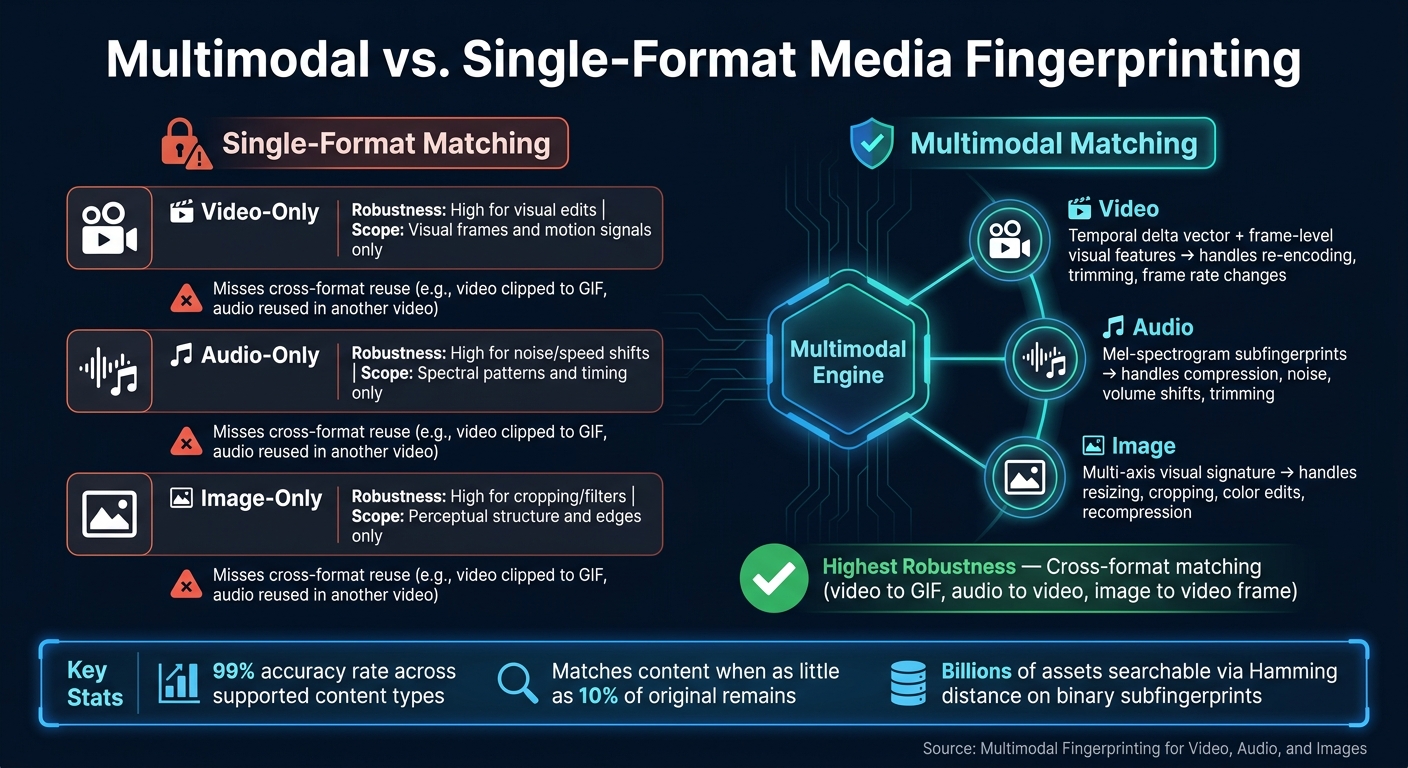
Multimodal vs. Single-Format Media Fingerprinting: A Visual Comparison
How Cross-Media Matching Improves Detection Coverage
Once video, audio, and images are fingerprinted on their own, cross-media matching ties them together across formats.
Here’s the issue with single-format matching: it only sees part of the picture. A licensed sports highlight can turn into a GIF. A podcast interview can be clipped and dropped into a video. A screenshot can later show up inside a screen-recorded video. If your system checks just one format at a time, a lot can slip through.
Cross-media matching fixes that by mapping video, audio, and images into a shared fingerprint space. That lets the system compare assets directly across formats. So a frame pulled from a video can match a standalone image. And an audio segment taken from a video can match a registered podcast file.
That same matching layer is what makes piracy detection, rights checks, and source tracing work at scale.
The table below shows where single-format methods fall short next to a multimodal system.
| Approach | Robustness | Matching Scope |
|---|---|---|
| Video-only | High for visual edits | Visual frames and motion signals |
| Audio-only | High for noise/speed shifts | Spectral patterns and timing |
| Image-only | High for cropping/filters | Perceptual structure and edges |
| Multimodal | Highest | Cross-format (video to GIF, audio to video) |
Use Cases: Piracy Detection, Rights Verification, and Source Tracing
A media company tracking broadcast rights can detect when an edited sports highlight is uploaded somewhere else, even if the clip has been stripped of its original audio, cropped, and re-encoded. Because the system checks both frame-level signatures and clip-level temporal patterns, even heavily changed excerpts can still trigger a match alert [3].
Brands can use the same setup to spot unauthorized product videos that were cropped, re-encoded, or reposted. Publishers and podcast networks can also flag clipped audio segments reused inside another video.
These matches matter when they feed into an ownership and enforcement workflow.
How InCyan and ScoreDetect Fit Into the Workflow

InCyan ties identification, verification, and enforcement into one workflow. Idem matches content across images, video, and audio with a 99% accuracy rate across supported content types [1]. Tectus places an invisible watermark at the moment of creation, adding a proof layer before any reuse happens. ScoreDetect records a blockchain checksum of the content, creating a verifiable chain of custody without storing the actual asset.
The workflow is simple:
- Register the asset
- Detect reuse with Idem
- Timestamp ownership with ScoreDetect
- Use the match record for enforcement
Implementation Limits, Evaluation, and Conclusion
Technical Tradeoffs: Compute Cost, Database Scale, and Signal Weighting
Once fingerprints become searchable, the next problem is scale: cost, speed, and tuning.
Fingerprinting at scale is compute-heavy and slow. The same fine-grained features that help accuracy also add compute and storage load. Fine-grained fingerprints can catch subtle edits and partial matches, but they take up more space. Coarse-grained fingerprints are faster to index and easier to use across large libraries, but they can miss heavily clipped or remixed content [2]. There’s no one-size-fits-all option here. The right setup depends on how your content is used and what kinds of edits you need to catch.
A shared scoring model can compare signals across modalities, but the weights need to fit your content type. Get the sensitivity too high, and false positives go up. That usually means more work for human review teams.
What to Measure Before Rolling Out at Enterprise Scale
Before a full rollout, test the system against the edits your content actually goes through. Lab tests are fine, but production is where things get messy.
| Metric Category | What to Test | Why It Matters |
|---|---|---|
| Accuracy | Precision, recall, false-positive rate | Minimizes unnecessary manual review |
| Robustness | Cropping, re-encoding, filters, speed changes, noise injection | Confirms detection survives real-world edits |
| Partial Matching | Minimum content threshold (e.g., 10%) | Catches short clips and remixed segments |
| Efficiency | Processing speed, hash length, storage demand | Determines feasibility at scale |
| Temporal Dynamics | Scene transition detection, motion intensity tracking | Tracks provenance in video and live streams |
Advanced systems like InCyan’s Idem are designed to identify assets even when only 10% of the original content remains [1]. That sounds strong on paper, but the better test is simple: check that threshold against your own library. If it holds up there, you’ve got a much clearer picture of production fit.
Conclusion: Why Multimodal Fingerprinting Outperforms Single-Format Matching
When one signal breaks down – for example, when audio is removed from a video clip – the visual and temporal signals may still carry enough information to trigger a match. That’s the main edge of multimodal fingerprinting. Instead of depending on one format alone, it uses different modalities together, which improves robustness and discriminability [2].
The best system isn’t the one with the most complex design. It’s the one that stays accurate under the edits your content actually faces and stays manageable at enterprise scale. For enterprise protection, fingerprinting works best when it’s paired with ownership proof and enforcement workflows.
FAQs
How does multimodal fingerprinting differ from hashing?
Traditional hashing creates a checksum that changes completely if even one bit in a file changes. So it can only confirm an exact match.
Multimodal fingerprinting works differently. It builds a signature from a file’s semantic and structural features, like motion, audio patterns, and visual geometry. Because of that, it can still recognize the same content after cropping, re-encoding, or compression.
Can it still match heavily edited or partial content?
Yes. Multimodal fingerprinting is built to spot heavily edited or partial content because it uses AI embeddings that represent an asset’s semantic core, not just its pixels or file structure.
That’s why it still works after changes like cropping, re-encoding, compression, or color filters. And for partial matches, InCyan’s Idem can identify content even when only 10% of the original is left.
What should I test before deploying it at scale?
Before you scale multimodal fingerprinting, make sure the system can handle high search volume without slowing to a crawl. A good place to start is ANN and HNSW, which support sublinear search and help keep retrieval fast as the index grows.
It’s also worth checking how Product Quantization (PQ) performs for in-memory indexes, whether GPU acceleration speeds up vector comparisons enough for your workload, and how well the system holds up when content has been heavily modified. That last part matters more than people think. A match that works on near-duplicate content but fails after edits, cropping, compression, or remixing won’t hold up in production.
For enterprise use, InCyan’s Idem engine can help maintain matching accuracy.