If I need to stop live stream piracy, I use fingerprinting to find the stolen stream and watermarking to trace the leak back to a user or session.
That’s the short answer. In live streaming, both tools do different jobs:
- Fingerprinting checks whether a live stream matches my content
- Watermarking links a leaked copy to a viewer, account, or session
- Fingerprinting does not change the video
- Watermarking adds hidden or visible data before playback
- Fingerprinting can flag a stolen restream in about 5 seconds
- Watermarking may need 30 to 90 seconds of pirate video to read the embedded ID
- A 64-bit watermark payload can map up to 18 quintillion sessions
If I only want detection, fingerprinting helps. If I need proof of which account leaked the feed, watermarking matters. Most live streaming teams use both because one answers “Is this my stream?” and the other answers “Whose copy is this?”
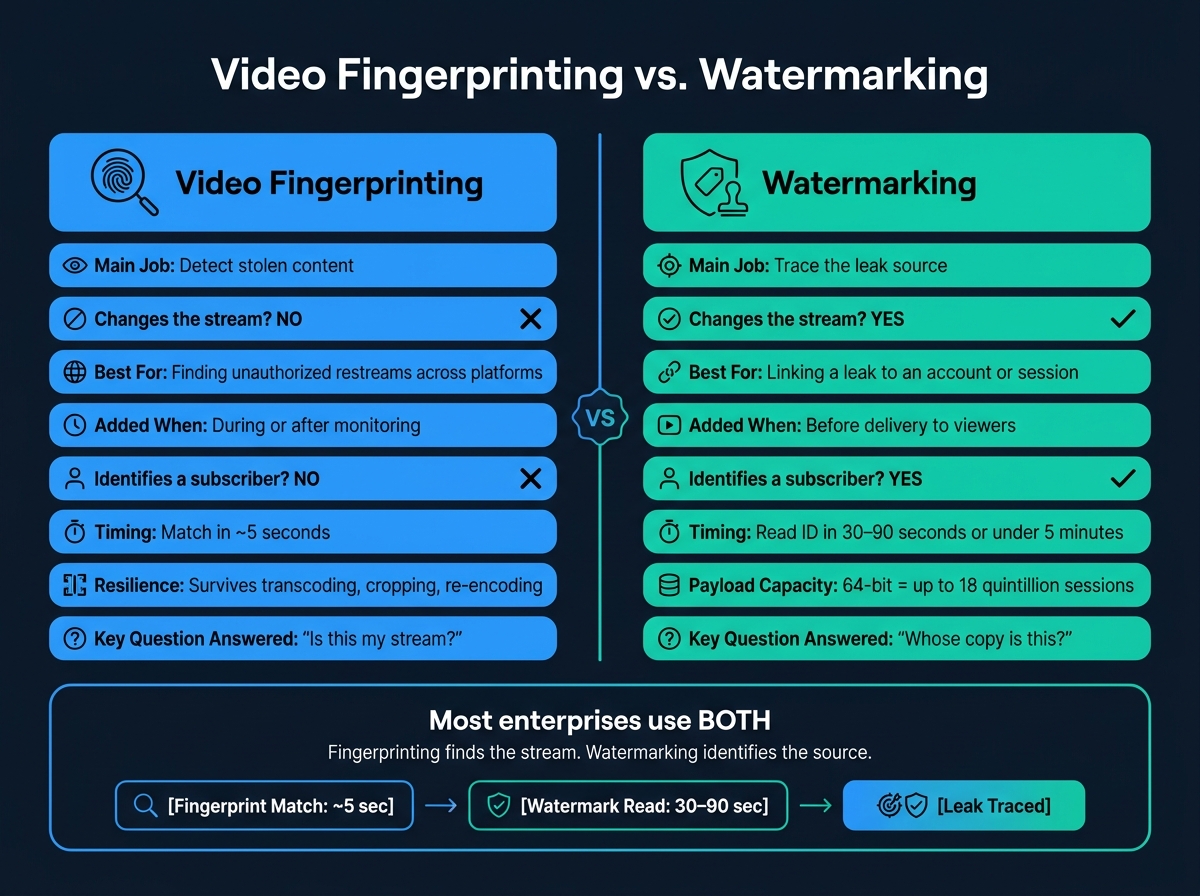
Video Fingerprinting vs. Watermarking: Side-by-Side Comparison
Forensic Watermarking for Video Protection | How It Works & Why It’s Essential
sbb-itb-738ac1e
Quick Comparison
| Criteria | Video Fingerprinting | Watermarking |
|---|---|---|
| Main job | Find matching content | Trace the leak source |
| Changes the stream? | No | Yes |
| Best for | Detecting stolen restreams across platforms | Linking a leak to an account or session |
| Added when | After or during monitoring | Before delivery to viewers |
| Works after cropping or re-encoding? | Often yes | Sometimes, but it can weaken |
| Can identify a subscriber? | No | Yes |
| Typical live timing | Match in about 5 seconds | Read ID in 30 to 90 seconds or under 5 minutes |
So if I’m protecting live sports streams that may be worth millions of dollars in a 2- to 4-hour window, I don’t treat these tools as either-or. I treat them as a pair: detection first, source tracing next.
How Video Fingerprinting Works in Live Streaming
Video fingerprinting works by pulling a compact signature from the video and audio itself. Think of it as a content ID built from the stream’s visual and sound patterns. The original stream isn’t changed at all.
That signature is then checked against a reference database of owned content. If the system finds a match that clears its confidence threshold, it flags the stream as infringing, often within 5 seconds of playback starting [2]. In live streaming, that check needs to happen while the event is still on air, not after the fact.
How fingerprinting detects unauthorized live restreams
In a live streaming setup, fingerprinting systems create rolling signatures from incoming data chunks and compare them with the reference database on a constant basis. That lets the system flag a pirated restream while the event is still live.
It also holds up well even when the stream has been altered in common ways, including attacks to remove protection:
What fingerprinting can and cannot do
Fingerprinting works well for large-scale discovery and monitoring across social platforms, websites, and open streaming endpoints, especially when adding a marker ahead of time isn’t practical.
But there’s a limit: it can’t tie a leak back to a specific user or session [2]. That’s the part fingerprinting misses. Watermarking handles attribution.
How Watermarking Works in Live Streaming
Unlike fingerprinting, watermarking changes the stream before it reaches the viewer. Fingerprinting reads what’s already there. Watermarking, on the other hand, embeds identifying data into the media itself, usually as a session-specific ID.
Visible vs. invisible watermarking in practice
Visible watermarks include things like logos, overlays, or even a reviewer’s name on screen. They’re blunt, but they work as an instant warning.
Invisible watermarks are more subtle. They use mathematical embedding methods to hide data in the stream without affecting what the viewer sees. The goal is simple: keep the watermark imperceptible while making sure it survives common changes like compression, resizing, and re-encoding.
How forensic watermarking traces the leak source
The main job of forensic watermarking in live streaming is per-session attribution. Each viewer gets a stream with its own embedded identifier. That ID can then be tied back to a specific subscriber account, session, device, IP, and timestamp in the operator’s database.
One common method is A/B variant watermarking, standardized as ETSI TS 104 002. It gives each viewer a distinct segment pattern that maps back to a session ID, and it can identify the leaking subscriber in under 5 minutes [3].
That said, watermarking isn’t bulletproof. Watermarks can fail after repeated re-encoding, while fingerprinting usually survives more transformations [2]. That’s the key difference: watermarking helps identify who leaked the stream, while fingerprinting helps recognize what content is being shared. In practice, the two work side by side rather than one taking the other’s place.
For vendors, InCyan’s Tectus offers invisible watermarking for video, image, and audio. ScoreDetect adds blockchain timestamping to help prove ownership.
Key Differences Between Video Fingerprinting and Watermarking
Purpose, deployment, and effect on the stream
Fingerprinting asks, "Is this my content?" Watermarking asks, "Whose session leaked it?" In live streaming, that split matters. One helps you spot stolen content at scale. The other helps you trace the leak back to a person or session.
Fingerprinting does not change the stream. It pulls a signature from the media as it is. Watermarking works the other way around. It places a payload into the stream, either visible or invisible, before the content reaches the viewer.
That timing is a big deal. Watermarking has to be added before distribution. Fingerprints, on the other hand, can still be created after a leak shows up.
Resilience, evidence, and enforcement value
Fingerprinting tends to hold up better against re-encoding and cropping. Watermarking is stronger when you need to connect a leak to a specific session.
So what does that look like in practice? Fingerprinting can tell you that a live restream matches your content. But it can’t tell you which subscriber or session was behind it. Forensic watermarking can.
That session-level link is what makes watermarking useful for account enforcement, legal evidence, and leak tracing. You see the gap most clearly when it’s time to move from detection to enforcement.
| Feature | Video Fingerprinting | Watermarking |
|---|---|---|
| Content Modification | None; non-invasive | Invasive; embeds a data payload |
| Live Deployment Focus | Real-time rolling signatures and reference matching | Integrated into the encoder, CDN, or player |
| Typical Piracy Use Case | Detecting unauthorized restreams across social platforms | Account-level enforcement and legal action |
Together, they make up the detection-and-attribution stack of technology solutions to stop digital piracy.
How Enterprises Use Both Methods Together
A live streaming workflow from detection to attribution
Enterprises use fingerprinting to spot unauthorized restreams. They use watermarking to trace the leaking session.
Before a live event starts, reference fingerprints are created from the master feed in real time using rolling signatures. At the same time, each subscriber gets a uniquely watermarked stream with an invisible session-level identifier embedded during delivery.
When a pirate restream shows up, the fingerprint match triggers the alert. Modern systems can flag unauthorized content within 5 seconds of playback starting [2]. From there, the watermark is pulled from the pirate capture to identify the account or session behind the leak. A 64-bit payload can distinguish up to 18 quintillion sessions [3].
That means one workflow does two jobs: fingerprinting finds the stolen stream, and watermarking ties it back to a source.
The hard part is timing. Monitoring services need 30 to 90 seconds of the pirate stream to read the watermark with enough confidence [3]. In live sports, that window is tight. That’s why automated monitoring isn’t just nice to have. It’s part of the job.
Where InCyan and ScoreDetect fit in the workflow
Use Tectus for invisible session watermarking. For enforcement-ready proof, InCyan’s ScoreDetect records the ownership checksum on blockchain.
ScoreDetect does not store the original media asset; instead, it captures a checksum of the content and records it on the blockchain, creating a verifiable record of ownership without requiring the original file [3].
Conclusion: Picking the Right Method for the Right Job
Fingerprinting finds the stream. Watermarking identifies the source. For live sports and premium events, enterprises need both, plus a verifiable ownership record from ScoreDetect. Detection finds the stream; attribution closes the case.
FAQs
Do I need both fingerprinting and watermarking?
For the strongest protection, yes. Fingerprinting and watermarking do two different jobs, and they work best as a pair: fingerprinting identifies the content, while watermarking identifies the source of a leak.
Fingerprinting helps you spot unauthorized copies online, even after editing or compression. Watermarking adds invisible identifiers that can trace a leak back to a specific user, device, or session. When you use both, you can find infringing content and see who leaked it.
Which method is faster during a live stream?
Video fingerprinting is usually the faster option for live streams because it’s built for real-time identification. It uses rolling signatures to recognize media and spot unauthorized rebroadcasts while the stream is still live.
Digital watermarking is often added before or during distribution to prove ownership and trace leaks. Once an illegal stream is found, watermarking can help pinpoint where it came from. In many cases, it works alongside fingerprinting rather than replacing it.
Can watermarking still work after re-encoding or cropping?
Yes. Invisible watermarking is built to survive re-encoding, compression, and format changes.
Visible watermarks are much easier to strip out. Someone can crop them, blur them, or edit them away. Invisible forensic watermarks work differently. They’re embedded directly into the media, which helps them stay in place even after those kinds of changes.
InCyan’s Tectus offers this kind of blind watermarking for images, video, and audio.